



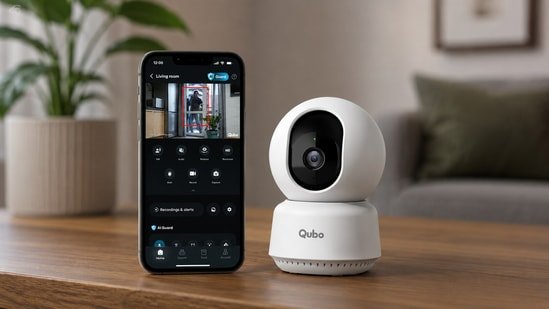
A few years ago, buying a home security camera meant choosing between expensive CCTV systems or cheap Wi-Fi cameras with unreliable apps. That gap has narrowed considerably. Today, even cameras under Rs. 3,000 promise AI detection, 360-degree coverage, cloud storage and two-way communication. The challenge isn’t finding one with a long feature list; it’s finding one that actually works consistently.
That’s exactly what I wanted to find out with the Qubo Smart Cam 360-degree 3MP 2K.
Instead of mounting it for a few hours, I used it the way most buyers would. It sat in my living room for nearly a week, monitoring the entrance while I worked, sending alerts whenever someone walked in, and occasionally doubling up as a way to check in on family members when I stepped out. By the end of the testing period, one thing became clear: Qubo has focused more on reliability than flashy features. That approach works in its favour, though it also exposes a few compromises that potential buyers should know about.
Design: Familiar, But Built Well
The Smart Cam 360-degree 3MP follows the familiar dome-style design we’ve seen from most indoor cameras, but that’s hardly a criticism. It is compact enough to sit discreetly on a TV cabinet, shelf or work desk without demanding attention.
The overall build feels sturdy, with no loose joints or flimsy plastic. The pan-and-tilt mechanism rotates smoothly, and the motor is quieter than several budget cameras I’ve tested. You can hear it when the camera changes direction in a silent room, but the sound is subtle enough not to become distracting.
One welcome upgrade is the inclusion of a USB Type-C port for power. It feels like a small detail until you need to replace the cable or use a longer one. At a time when many smart home devices are moving away from older connectors, it’s good to see Qubo making the switch. The supplied cable was adequate for my setup, though depending on where your nearest power outlet is, some users may still need an extension cable.
Installation and App Experience
A security camera should be simple enough for anyone in the family to install, and that’s exactly how the Qubo experience feels. Setup took less than ten minutes. After plugging in the camera, scanning the QR code through the Qubo app and connecting it to my 2.4GHz Wi-Fi network, the camera was ready to use. A firmware update was available during the initial setup, but it installed automatically without interrupting the process.
The companion app deserves credit for keeping things straightforward. Live view, recordings, notification history and camera settings are organised logically, so you rarely find yourself hunting through menus.
Over the course of my testing, live streaming usually loaded within a couple of seconds over Wi-Fi, while motion alerts reached my phone quickly enough to be genuinely useful. Whether I was checking on a delivery or simply confirming who had entered the room, the delay never became a point of frustration. The app also includes options for Privacy Mode, activity history and remote access, all of which worked reliably during my usage.
Where Qubo loses a few points is its push towards AI Guard, the company’s subscription service. The camera works perfectly well with local storage, but the app occasionally encourages users to upgrade for additional AI features and cloud services. It’s not excessive, but it is more noticeable than on competing apps like TP-Link’s Tapo.
Image Quality: The 3MP Sensor Delivers More Than Just Extra Pixels
Higher resolution is easy to advertise, but good image quality depends just as much on processing as it does on pixel count. The Qubo Smart Cam records at 1296p (3MP), which sits comfortably above standard Full HD cameras. In everyday use, the difference is noticeable when reviewing recordings rather than watching the live feed. I was able to zoom into recorded clips and still make out details like parcel labels and faces without the image falling apart as quickly as it would on many 1080p cameras.
What impressed me more was the camera’s image processing. Colours remain balanced without looking artificially saturated, and exposure is generally handled well under normal indoor lighting. During the day, facial details stay clear even when subjects are several metres away from the camera.
Like most indoor cameras in this price segment, it isn’t perfect when dealing with bright windows or harsh backlighting. In those situations, some highlights can become overexposed. TP-Link’s Tapo C220 still does a slightly better job in difficult lighting, but the difference is only obvious if you’re comparing the two side by side. For typical home monitoring, the image quality is more than sufficient and feels like a meaningful step up from older 1080p indoor cameras.
Pan, Tilt and AI Tracking: Reliable Without Being Overly Sensitive
A rotating camera is only useful if it knows when to move. The Qubo Smart Cam uses AI-powered human detection alongside its pan-and-tilt mechanism to follow movement across a room. During my testing, the camera tracked people consistently without reacting to every small movement around it.
That proved to be a good balance. Some cameras become overly enthusiastic, following ceiling fans, changing shadows or even curtains moving because of airflow. Qubo avoids that behaviour by waiting until it detects meaningful movement before tracking begins.
Tracking isn’t the quickest in this category. If someone walks rapidly across the room, the camera can take a moment to centre the subject again. However, once tracking begins, it follows movement smoothly and, importantly, returns to its original viewing position afterwards.
That consistency matters more than raw speed in day-to-day use because it means the camera is ready to monitor the room again instead of being left facing an empty wall.
Colour Night Vision: Useful, But Don’t Expect Miracles
Colour Night Vision is one of the headline features of the Qubo Smart Cam 360-degree 3MP, but it’s also one that’s easy to misunderstand. Unlike traditional infrared night vision, which switches to black-and-white footage, Qubo attempts to retain colour information when there’s some ambient light available. In my testing, the feature worked best in spaces with a porch light, hallway light or even a dim lamp. Under those conditions, it was easier to distinguish clothing colours and identify objects compared to a standard infrared feed.
In complete darkness, however, there’s no escaping physics. Once the room was pitch black, the camera relied on its low-light imaging, and the advantage of Colour Night Vision became less noticeable.
That’s not a flaw unique to Qubo; it’s how cameras in this category work. If your room has at least a little ambient light at night, the feature adds value. If it doesn’t, don’t expect cinema-like colour footage simply because the specification says “Colour Night Vision.”
Two-Way Talk and Built-in Siren
The two-way talk feature works exactly as you’d expect from an indoor Wi-Fi camera. Voice pickup from the built-in microphone is clear enough for everyday conversations, and the speaker is sufficiently loud to communicate with someone standing in the room. There is a slight delay, but it isn’t distracting for brief interactions.
The built-in siren is a welcome addition, though I suspect most people will rarely use it. It can act as a deterrent if an unexpected visitor enters your home while you’re away, but for everyday monitoring, it remains more of an emergency feature than something you’ll activate regularly. Still, it’s better to have it than not.
Where It Stands Against the Competition
The Qubo Smart Cam 360-degree 3MP enters a segment that’s already crowded with capable alternatives. The TP-Link Tapo C220 still has a slight advantage in image processing under difficult lighting and offers a more mature smart home ecosystem. If you’re already invested in TP-Link products, sticking with Tapo probably makes more sense.
The Xiaomi Smart Camera C300, meanwhile, remains a strong value-for-money option, but its software experience isn’t quite as polished. During my testing, I found the Qubo app easier to navigate and more straightforward for first-time users.
Where Qubo finds its own identity is in balancing ease of use with dependable performance. It doesn’t necessarily outperform every rival in every category, but it also avoids any major weaknesses that would make me hesitate to recommend it.
What I Didn’t Like
No product is without compromises. The first is Wi-Fi connectivity. Like most cameras in this category, it supports only 2.4GHz networks. That isn’t a major issue in practice, but users with dual-band routers may need to switch networks during setup.
I also wish Qubo offered a little more control over detection zones and notification rules. The current options are sufficient for most users, but enthusiasts who like fine-grained control may find them limited. Finally, while the app is generally reliable, the recurring prompts for AI Guard can feel unnecessary if you’ve already decided to use local storage. None of these is a deal-breaker, but they’re areas where Qubo still has room to improve.
Final Verdict
The Qubo Smart Cam 360° 3MP doesn’t try to win with an endless list of features. Instead, it delivers where an indoor security camera matters most – clear video, dependable AI detection, timely alerts and a stable app experience.
The 3MP sensor produces detailed footage, Colour Night Vision is genuinely useful in low-light conditions with some ambient light, and support for local storage means you don’t have to rely on a subscription. While features like 5GHz Wi-Fi and more advanced detection controls would have made it an even stronger package, these aren’t major drawbacks for most users.
If you’re looking for an indoor security camera that’s easy to set up, reliable in everyday use and offers a good balance of features for its price, the Qubo Smart Cam 360-degree 3MP is a solid choice. It may not redefine the category, but it gets the fundamentals right, and that’s what matters most.
Disclaimer: At Hindustan Times, we help you stay up-to-date with the latest trends and products. Hindustan Times has an affiliate partnership, so we may get a part of the revenue when you make a purchase. We shall not be liable for any claim under applicable laws, including but not limited to the Consumer Protection Act, 2019, with respect to the products. The products listed in this article are in no particular order of priority.


