



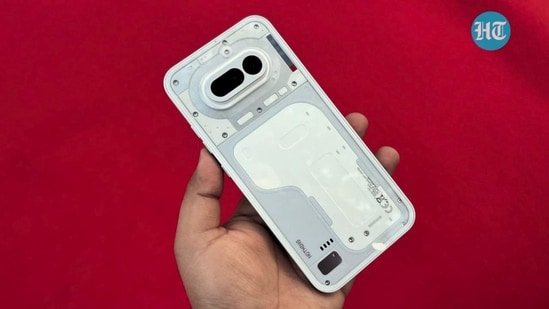
Like something straight out of Iron Man, where technology isn’t just functional but expressive, the Nothing Phone (4a) tries to turn a routine gadget into something you actually notice and interact with. I spent a few weeks using it as my secondary device, and what stood out early wasn’t just how it looks, but how it fits into everyday life. It doesn’t chase attention with loud changes; instead, it refines what already worked for the brand.
From the transparent back, evolving Glyph lights to a cleaner software approach, it reminds me of how Nothing is slowly shaping a design approach rather than rushing through upgrades. But beyond the looks, I wanted to see how it actually holds up in daily use, and that’s where things get more interesting. Here’s how the Nothing Phone (4a) performs when used day in and day out in this detailed review.
Nothing Phone (4a) Review: Signature Transparent Design
The Nothing Phone (4a) stays true to what the brand is known for – design that stands apart without trying too hard. From the moment I picked it up, the transparent back still feels like the highlight. It gives the phone a distinct identity, and the glass finish feels solid in the hand. That said, it is a bit slippery, so I’d suggest using a case if you plan to use it daily. The camera module now has a metal touch, and the bump is less noticeable this time, which helps the phone sit flat on a table.
That flat profile actually makes a difference in daily use. I could reply to messages or scroll without needing to lift the device every time. The phone does feel slightly heavy at just over 200 grams, and during longer sessions, you do notice it. Still, the flat edges help with grip, so it never felt uncomfortable to hold.
The new Glyph Bar is where things get more interesting. Instead of the earlier lighting setup, you now get a strip with multiple small LEDs. It’s brighter and more functional. I found it useful for checking timers, incoming calls, and even recording alerts without turning on the screen. It adds convenience, though not all lights behave the same; the red indicator works only during video recording or voice capture. You can turn it off if needed, which is a good touch.
Most of the Glyph features remain familiar, handling notifications, volume levels, and alerts in a visual way. It’s not a major shift, but it builds on what already worked.
Button placement has changed slightly. The power and volume buttons sit on the right, while the Essential Key has moved to the left. Personally, I didn’t find this very comfortable. The key sits a bit too high, and I often had to adjust my grip or use my other hand. On earlier models, it felt more natural. I also wish Nothing allowed custom actions for this button; it feels like a missed opportunity.
There are a few practical misses, too. The absence of NFC means no tap-to-pay support, which can be limiting. The fingerprint scanner works well in terms of accuracy, but it’s placed too low on the screen. I ended up relying more on face unlock, which felt quicker in everyday use.
Nothing Phone (4a) Review: Display and Audio
The Nothing Phone (4a) brings a noticeable step up in display quality this time. It features a 6.78-inch AMOLED panel with a 1.5K resolution, and that jump from the earlier model is easy to spot in daily use. Scrolling feels smooth with the 120Hz adaptive refresh rate, and touch response is quick enough for both gaming and general navigation. What stood out to me more, though, is the brightness. Whether I was stepping out in harsh sunlight or watching HDR content indoors, the screen stayed clear and readable without effort.
The phone sticks to a flat display with slightly thick bezels. While they are visible, I didn’t find them distracting after a point. In fact, the overall viewing experience remains consistent, but the added brightness makes a real difference compared to the previous generation.
I spent a fair amount of time watching shows and playing games on this panel, and it holds up well. Colours look lively, details are sharp, and motion stays fluid. By default, the “Alive” colour profile adds a bit of extra punch, which works well for videos. If you prefer a more natural tone, switching to the Standard mode tones things down nicely.
On the audio side, the stereo speakers do a decent job. They get loud enough for casual listening and keep vocals clear. There is a slight lean towards higher tones, and at full volume, the sound can lose a bit of clarity, but it never becomes distracting. For everyday use, the setup feels reliable.
Nothing Phone (4a) Review: Performance and Software
Under the hood, the Nothing Phone 4a is powered by the Snapdragon 7s Gen 4 chipset with up to 12GB RAM and UFS 3.1 storage, and its performance turned out to be one of its strongest aspects. In everyday use, the device feels steady. You can scroll through menus, switch between apps and perform routine tasks such as chatting on WhatsApp and browsing and scrolling on Instagram without experiencing any delay.
I didn’t run into random slowdowns, and apps stayed active in the background longer than expected. That made multitasking smoother, especially when jumping between social media, browser tabs, and messaging apps.
Gaming aligns with what you’d expect from this hardware. I tried demanding titles like BGMI and Free Fire, and both ran at stable frame rates without sudden drops. Heavier games like Genshin Impact needed lower settings for a comfortable experience. What stood out to me was how the phone handled heat. Even during longer sessions, it didn’t get uncomfortably warm, and I didn’t notice aggressive performance drops, which is a good sign for sustained usage.
On the software side, the device runs Nothing OS 4.1. The interface keeps things simple, with no extra apps pushed onto you. The black-and-white theme gives it a distinct look, and I liked that you can switch it on or off at any time. It feels different without getting in the way of usability.
In my time with the device, the software remained stable. I didn’t face crashes or major app issues. There were a few minor hiccups with some third-party apps, but nothing that disrupted daily use. Since this was a pre-release unit, there’s a fair chance these will be fixed with updates.
Nothing is offering three major Android updates and six years of security patches. While some brands have started offering more OS upgrades, this still keeps the phone relevant for a decent period.
As for AI features, tools like Google Gemini are included, along with image editing options. They work as expected, but they don’t take centre stage. The overall experience stays focused on smooth, reliable performance rather than feature overload.
Nothing Phone (4a) Review: Camera Experience
The Nothing Phone (4a) takes a clear step forward with its camera setup, and the addition of a periscope telephoto lens is where the biggest change lies. It includes a 50MP main sensor with stabilisation, an 8MP ultra-wide camera, and a 50MP telephoto lens. The 3.5x optical zoom from this telephoto camera is not something I usually expect in this range, and it does make a difference in day-to-day shooting.
The prism-style design helps fit this zoom system into the phone without making it bulky. While using it, I noticed that images from the telephoto lens come out clean, with a balanced contrast that doesn’t feel overdone. It feels like Nothing is slowly refining its camera tuning, and this phone reflects that progress.
Portrait mode offers multiple focal lengths – 24mm, 48mm, and 80mm. I found myself using the 24mm and 48mm options most of the time. It gives a more natural background blur and handles subject separation well. You do need to step back a little to get the right frame, but the output looks closer to what you’d expect from a dedicated camera.
In daylight conditions, the performance is reliable. Shots come out detailed, and colours stay balanced without looking forced. I also liked how the camera handled indoor scenes. In places where lighting is uneven, it manages highlights and shadows well, which is something I always look for in a phone camera.
Low-light photography is also dependable. The camera doesn’t try to artificially brighten everything, which I personally prefer. It keeps the scene close to how it actually looks, while still retaining enough detail. Noise is present in some cases, but it stays under control, and stabilisation helps avoid blur.
Portrait shots are another area where the device does well. The telephoto lens adds a more natural depth effect, and edge detection works fine in most situations. I didn’t notice major issues while shooting people or objects.
The front camera, however, feels like a weak point. In my usage, selfies often struggled with skin tones and missed finer details. It’s usable for casual shots, but it doesn’t match the rear cameras’ consistency.
There’s also room for improvement on the software side. At times, HDR processing feels a bit too aggressive, pushing contrast and colours more than needed. This is something that can likely be fixed with updates, and if that happens, the overall camera experience could become more consistent.
Nothing Phone (4a) Review: Battery and Charging
With the Nothing Phone (4a), the battery experience feels steady but not ahead of the curve. The 5,400mAh unit is slightly larger than before, and the optimisation helps maintain consistent output, though it doesn’t match the bigger batteries seen in some competing phones.
In my daily routine, the phone comfortably lasted a full day. With calls, social media, streaming and some camera use, I usually get around 6 to 7.5 hours of screen-on time. It’s reliable for most users, but on heavier days, I did need a quick top-up. With lighter use, there was still some charge left by the end of the day.
Charging is straightforward. A full charge takes about 90 minutes, but you’ll need to buy a compatible 50W charger separately, as only a Type-C cable comes in the box.
Final Verdict
The Nothing Phone (4a) feels like a well-balanced device that focuses on getting the basics right while keeping its identity intact. The design still stands out, the display is reliable for everyday use, and performance remains steady even with demanding tasks. The telephoto camera adds real value, though the front camera and occasional HDR inconsistency hold it back a bit. Battery life is dependable, but charging could have been faster at this price.
At Rs. 31,999, it makes sense if you want something different without compromising on core experience. However, if features like NFC, faster charging, or stronger selfie output matter more to you, there are better options to consider.
Specifications
Rear Camera
50MP + 50MP + 8MP
Processor
Snapdragon 7s Gen 4
Reasons to buy
Unique design
Smooth performance
Smooth display
Clean software
Telephoto camera
Reason to avoid
No NFC
Slow charging
Feels heavy
Slippery build


