



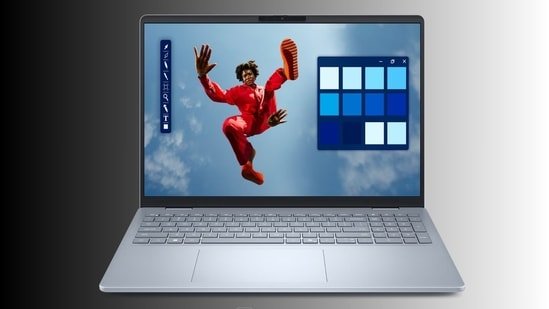
Dell 15 AI PCs: AI laptops are now everywhere, but not every machine actually changes how people work. In many cases, the “AI PC” label feels more like branding than something users notice in daily use. Dell’s new Dell 15 lineup takes a more practical route. Instead of focusing on numbers that look good on paper, these laptops target common workloads like multitasking, video calls, browser-heavy use, office work, and battery efficiency.
The lineup includes Intel Core Ultra and AMD Ryzen options, giving buyers multiple configurations depending on how they use their laptop. Here’s a closer look at the Dell 15 AI PC range.
This model is built for users who spend most of their time handling routine tasks like online classes, meetings, document editing, streaming, and web browsing. It runs on the Intel Core Ultra 5 225H processor, which also includes an integrated NPU designed to support AI-based workloads more efficiently.
Dell pairs the processor with 8GB RAM and a 512GB SSD. For users working on standard office tasks and daily productivity, this setup should handle workloads comfortably. The SSD also helps with faster boot times and quicker app loading compared to older hard-drive-based systems.
The laptop features a 15.6-inch Full HD anti-glare display with narrow bezels. Dell has also included a dedicated Copilot key for quick access to Microsoft’s AI features in Windows 11. This may help users who regularly rely on AI-assisted writing, summaries, search tools, or meeting support features.
The Core Ultra 7 version is aimed at users with heavier multitasking needs. Dell upgrades the memory to 16GB RAM while keeping the 512GB SSD storage configuration unchanged. That memory upgrade matters more than many users realise. Modern browsers, video conferencing apps, cloud-based tools, and AI features consume more RAM than before. Users working with multiple tabs, large spreadsheets, presentations, or productivity software will likely notice smoother performance here.
The Intel Core Ultra 7 processor also gives the system more room for sustained multitasking and AI-assisted workflows. While this is not designed as a gaming or professional editing machine, it should comfortably support business use, remote work, and moderate creative workloads.
Dell continues offering features like ComfortView software for reduced eye strain, AI-backed call enhancements, and fast charging support. Despite the upgraded hardware, the laptop still weighs around 1.66kg, making it manageable for daily travel.
This configuration sits between the two Intel variants and may end up being the most balanced option in the lineup. It combines the Intel Core Ultra 5 processor with 16GB RAM, offering better multitasking capability without pushing buyers into the higher-priced Ultra 7 segment.
For many users, the jump from 8GB to 16GB RAM will likely make a bigger difference in daily performance than moving to a higher-tier processor. Tasks like running multiple Chrome tabs, video calls, background apps, and AI-assisted software can quickly consume memory resources.
The laptop also includes a Full HD display with up to 300 nits brightness, narrow bezels, SSD storage, Copilot integration, and fast charging support. Users looking for a work-focused laptop without overspending may find this version more practical than the base model.
Dell’s AMD-powered variant targets users who prefer Ryzen processors or want a different performance-to-price balance. This model runs on the AMD Ryzen 5 7530U Hexa Core processor and includes 16GB RAM with a 512GB SSD. Unlike the Intel Core Ultra variants, this version is not positioned around AI acceleration. Instead, it focuses more on productivity, entertainment, and smooth everyday performance.
One key difference is the 120Hz Full HD display, which offers smoother scrolling and motion compared to standard 60Hz panels. The integrated AMD Radeon graphics also provide better support for casual gaming and media consumption.
Dell also bundles Windows 11 Home and Microsoft Office Home 2024 with this variant, which may appeal to students and home users looking for a ready-to-use setup. At around 1.67kg, portability remains close to the Intel models.
5 Things to Consider Before Buying
1. RAM Capacity
If you multitask regularly, choose a 16GB RAM variant instead of 8GB for smoother long-term performance.
2. Processor Choice
Core Ultra 5 works well for regular productivity, while Core Ultra 7 suits heavier multitasking and office workloads.
3. Display Requirements
Users who watch content or prefer smoother scrolling may find the AMD variant’s 120Hz display more useful.
4. AI Features
Intel Core Ultra models include AI-focused tools and Copilot integration that may help with meetings, summaries, and workflow assistance.
5. Usage Type
Students and casual users may prefer the Ryzen 5 version, while professionals handling multiple apps daily may benefit more from Intel Ultra models.
Disclaimer: At Hindustan Times, we help you stay up-to-date with the latest trends and products. Hindustan Times has an affiliate partnership, so we may get a part of the revenue when you make a purchase. We shall not be liable for any claim under applicable laws, including but not limited to the Consumer Protection Act, 2019, with respect to the products. The products listed in this article are in no particular order of priority.


