



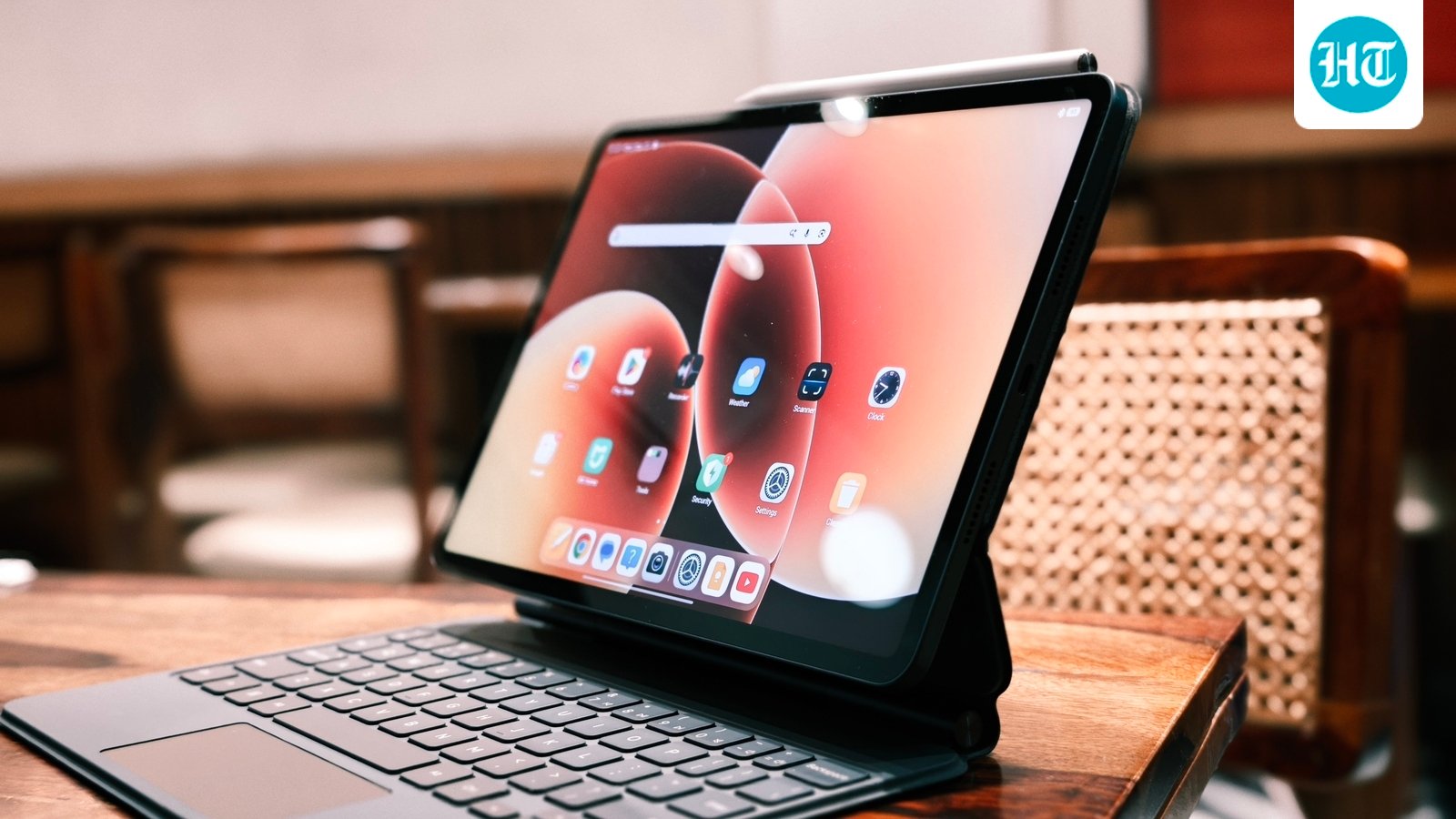
Xiaomi Pad 8 review: There are very few times when a tech product comes along that shakes your belief system. I was, for the most part, under the impression that Android tablets under ₹50,000 couldn’t provide a flagship-grade experience. Oh, how horribly wrong I was!
Everything changed when I started using the Xiaomi Pad 8 as my default tablet of choice, alongside its Focus Keyboard and the Xiaomi Focus Pen, both of which are sold separately. Let me tell you, I used the whole combo without touching my iPad Air M3 or the iPad mini 7th generation. The experience was that good.
That said, it wasn’t all petals and roses, because the tablet does have its shortcomings, but nothing that distracts you from the tremendous value it offers. I will also tell you who shouldn’t buy this tablet at all because, yes, there is a group that should steer clear.
Excited to read the full deal? Read on. This is my detailed account of using the tablet for almost half a year.
Before we get started, here are the prices for the tablet and the versions that we have:
Xiaomi Pad 8 Focus Keyboard: ₹8,999
Xiaomi Pad 8 (12GB+256GB) With Pen: ₹48,999
Total combo value: ₹58,998, which is 34.37% less than the iPad Air M4 and 1.67% less than the OnePlus Pad 4 standalone. Also, yes, there has been a price hike compared to the launch price, but I would still call it a bargain compared to its rivals.
Xiaomi Pad 8 review: Display and multimedia content consumption are stellar
Let’s be real, most of us use our tablets for media consumption, and I did the same, alongside some productivity bits. And, truth be told, the experience was sublime. Not once did I miss my iPad Air. The screen is that good.
It is not an OLED screen, but the black levels on offer are decent. It is a high-quality IPS LCD panel, no two ways about it. It offers a 144Hz refresh rate, and that makes for buttery smooth operation. Viewing angles are good as well, and so is the peak brightness. Not once did I wish that the screen could be a little brighter. I can’t say the same about the reflections, but then you have the nano-texture version if that is something you really care about. Gotta pay to play.
I have played most OTTs on it, alongside YouTube, including Netflix, Amazon Prime and JioHotstar. And yes, the Pad 8 supports Widevine L1. So, no worries there for your streaming needs in the highest quality possible.
The 11.2-inch 3K display has excellent colour tuning as well. It is fairly accurate, and I didn’t find it lacking in any capacity whatsoever. That’s a big compliment for a tablet that can be had for under ₹40,000.
So yes, you are not compromising on the display, and I say this having used the iPad Air M3 13-inch in tandem. You do start noticing the 60Hz after a while, though. Ahahaha.
Coming to the rest of the multimedia consumption highlights, mostly the speakers, I would rate the tablet highly here as well. Easily 8/10 speakers.
It has a quad-speaker setup, which, again, is better than even the iPad Air’s two-speaker setup. The speakers also support Dolby Atmos tuning, and they sound really full for the most part. That said, you can muffle them every now and then if you are holding the tablet in a certain way, but then again, that holds true for most tablets.
Luckily, I was using it with the Focus Keyboard, and that solved the problem for me.
S-tier multimedia consumption, for sure. It punches way above its weight class.
Coming to what might be boring stuff for some people: how is it for working and content creation?
See, if you are expecting iPad-level productivity, and you are a die-hard artist who got smitten by the Apple Pencil 2nd generation or the Pro, you won’t get that level of refinement here. As simple and blatant as that.
But at the same time, if you are not that user, this shouldn’t affect your purchase decision. This mostly has to do with Procreate not being available on Android, so it holds true for most Android tablets.
But again, for content creation, you do have the likes of LumaFusion available on Android now. Yes, it is a paid app, but at least you have that option.
You can simply download LumaFusion on your Xiaomi Pad 8. I did. I own the app, and I can tell you the experience was buttery smooth, not as good as my iPad Air M3, which I also use, but almost there. It never underwent a hiccup. It was just a buttery smooth experience all the time.
I did 4K video editing, multiple layers with a lot of text, and the experience never skipped a beat. It always performed well.
It also helps that the unit I have comes with a Focus Keyboard and Focus Pen, and they are the perfect accessories for this sort of stuff. It makes the experience almost like using a dedicated laptop. It’s not just as good as a MacBook, I would say, but it’s almost there, which, again, is a big statement.
Performance and battery life, at large, are great
Again, the unit I have of the Xiaomi Pad 8 has the Snapdragon 8s Gen 4, which is standard across the lineup, and I have the model with 256GB storage and 12GB RAM, running on Xiaomi HyperOS 3.
Now, these are great specs for the price, I would say. There’s also a model available with 8GB RAM and 128GB storage.
Coming to the performance itself, I would say the CPU performance has been excellent. In Geekbench scoring, our unit scored 6,345 points, which is a great multi-core score in Geekbench. As for AnTuTu CPU, our unit scored 2.26 million overall.
As for AnTuTu GPU scoring, it scored 7.56 lakh. Now, these are great numbers and are a good indicator of how the tablet could perform, and it does translate into real-world usage.
I was able to game on the tablet quite comfortably. And yes, you can get 90fps in BGMI if you’re looking for it. So you’re covered on that front.
Having said that, it has a 9,200mAh battery, which performs great. You can easily expect the tablet to last two full working days on heavy usage. There was not a single time that I thought the battery life was lacking. However, the charging speed is definitely lacklustre.
My usage involved watching a lot of YouTube, streaming OTT content, editing photos here and there on Lightroom, and all of that. For this usage, it lasts way beyond two days for me.
Having said that, I believe Xiaomi has been lagging on the optimisation front here a little. While the idle battery drain is great, it does often drop a little too much in certain scenarios, which can be mitigated considering there is a rather large battery.
You should know that different models have different UFS storage types. The 8GB model comes with UFS 3.1 storage, while the 12GB model comes with UFS 4.1 storage. So, if you want the better performance, I would recommend getting the higher-end version.
But also remember that there is a price difference.
So, would I recommend the highest-end version? Maybe.
The base model now starts at ₹38,999, while the 12GB + 256GB model starts at ₹43,999. So, you’re not paying too much extra and are getting better storage and more RAM, which is invaluable in this day and age.
I would get the 12GB + 256GB model, especially considering the value you get..
Xiaomi Pad 8: Design and build quality are S-Tier
I can’t begin to tell you the number of times people have confused the Xiaomi Pad 8 for an iPad Pro. Yes, it looks so similar, especially with the Focus Keyboard and the Focus Pen.
So, aesthetics-wise, Xiaomi seems to be going the Apple way, but I don’t think that’s necessarily a bad thing.
The build quality of this tablet is solid. It’s built like a tank. It has a metal construction, and the display barely has any scratches throughout my usage. The Focus Keyboard has to be the star of the show for me.
The hinge is solid, the keyboard feels super tactile and fun to type on, and the trackpad is not flimsy like other keyboards you get. The Focus Pen is super nice. It almost feels as good as the Apple Pencil Pro that I use. It has magnetic connectivity for charging.
The tablet just feels like a really solidly built piece of hardware. I would rank it in the same territory as the iPad, and that’s just big words for this tablet.
Having said that, I would get the Graphite Gray version of the tablet and not the Titanium Blue. I’ve seen both in person, but Graphite Gray just looks more discreet and more polished.
Also, another thing that I wouldn’t recommend is the nano-texture display model. I’ve seen it firsthand with a friend, and it can dim down the content, especially in bright surroundings. That’s what I felt, at least. That’s just a personal observation.
Also, it is certainly more expensive, coming in at ₹46,000. So, if you’re not going to be taking advantage of it, I wouldn’t actually recommend it.
The meeting experience is decent, too
The cameras on the Xiaomi Pad 8 are good for the most part. They are not going to replace your smartphone for photography, nor are they meant to, but they are more than capable for the kind of things you would typically use a tablet camera for. The front camera, in particular, impressed me during video calls, with a crisp and clear output that kept me looking sharp. Overall, the cameras are not the biggest highlight of the Pad 8, but they are certainly good enough for everyday use.
Verdict: Get it before Xiaomi bumps up the price again!
The Xiaomi Pad 8 has quietly become my everyday go-to tablet of choice.
I do a lot on it. I type, I consume, I game, I produce, and a whole lot more. And the subtle touches, like having full DC dimming, the option to get a nano-texture display, the excellent speaker setup, quad speakers, by the way, like I told you about, and the general build quality on offer, make it hard to beat.
Even after the price hike, the tablet starts at around ₹39,000. So, if you are in the market for a top-tier Android flagship and don’t want to spend iPad money or upwards of ₹50,000, I think the Xiaomi Pad 8 makes a lot of sense and will continue to do so for years to come.
Having used it for the past half a year and more, this has earned a permanent spot in my backpack.


