



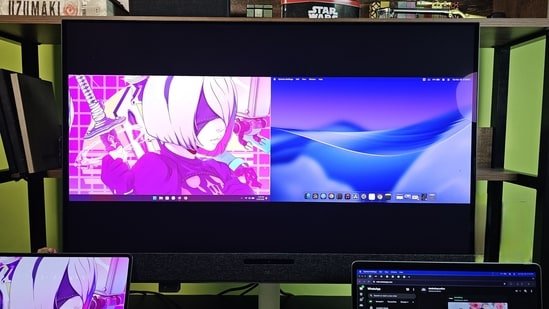
The Dell 32 Plus 4K QD-OLED S3225QS monitor is not specifically an office or a gaming monitor, and my two weeks of usage made that very clear. This monitor from Dell can do way more than a typical gaming or business display, and one feature that truly stands out is the 3D spatial audio system with powerful sound.
I tried everything on this monitor, from writing and daily work to gaming and video editing. So let’s break down if the extra effort from Dell is actually worth it or not.
Design and build
Dell has moved away from its usual silver and black aesthetics on this monitor and that’s a welcome change. This monitor looks premium from every angle. The entire setup comes in a white finish with a slightly rough, grainy texture, even on the stand. While it looks premium, the in-hand feel could have been better. A smoother finish would have felt a bit better and also easier to clean.
The speakers are placed on the front, covered with fabric, with a camera and sensors positioned in the center. It gives the monitor a unique identity compared to typical desktop monitors.
The stand is simple but highly functional. You get full adjustability including height, tilt, swivel, and rotation. At the back, there’s VESA mount support along with neatly placed ports. Dell has also added cable management clips and a pass-through hole in the stand to keep your desk clean and clutter-free.
The buttons are placed at the back on the bottom right corner (when viewed from the front). There’s also a hidden Type-C port tucked under the display, which supports up to 18W charging and data syncing.
The display is quite glossy, so if your workspace has a lot of ambient light, glare can be an issue.
The setup process is quick and straightforward. You just assemble the stand and attach it to the display. In-box contents are also sufficient to get you started right away, so you don’t have to look around for extra cables or accessories.
Picture quality
Let’s get through the picture quality first, because there’s a lot more to talk about in terms of features. The 32-inch OLED panel is fantastic for almost everything. It supports HDR and Dolby Vision, and when paired with the built-in speakers, it creates a very immersive experience for watching movies.
The display also supports a 120Hz refresh rate, making it suitable for gaming. I played a bunch of single-player titles like Silent Hill, Doom Eternal, and Forza Horizon, and the experience was very enjoyable and smooth.
There are plenty of customization options, including multiple color profiles, which allow professionals to calibrate the display based on their specific workflows.
On paper, the peak brightness of 250 cd/m² may seem low, but in real-world usage, especially when you’re sitting a few feet away from a 32-inch screen, it feels perfectly adequate for SDR content. With HDR, the brightness can go up to 1000 cd/m², which makes a noticeable difference in games and movies.
Sound Quality
Dell 32 Plus 4K QD-OLED monitor features the sound bar below the display and it houses five 5W speakers that creates loud audio. Apart from that, you also see a camera paired with a few sensors for Spatial Audio feature. The volume can be adjusted from the monitor itself in the OSD menu using the joystick available at the back.
The sound quality is filling and delivers an overall balanced sound, do not expect punchy bass though. You don’t need desktop speakers if you have this monitor for sure. The surround is the main attraction and I think it works amazingly well, the face detection is on point and almost instant. Whether its music, movies or game, the surround sound experience is amazing.
Connectivity
Connectivity is one area where this monitor feels slightly limited. You get one HDMI port and one Type-C port for video input. There are two additional Type-C ports, one at the back and one hidden under the display, but they are meant for data transfer and charging only, supporting up to 15W.
If you plan to connect multiple devices like a PC, a laptop, and a console such as a PlayStation, you will likely have to switch cables manually or rely on an external HDMI switch. I tested the monitor with both Windows and a MacBook, and compatibility remains consistent across both platforms.
One feature that really stands out here is the Picture-in-Picture and Picture-by-Picture mode. It also supports KVM functionality, allowing you to use a single keyboard and mouse across multiple connected devices.
This was easily one of my favorite features. I often had my MacBook and another laptop connected at the same time, and even in split mode, both screens were large enough to work comfortably.
Pros and Cons
Pros:
- Stunning 4K QD-OLED panel with excellent colors and contrast
- 120Hz refresh rate for smooth gaming and usage
- Unique 3D spatial audio with powerful built-in speakers
- Premium design with good ergonomics and adjustability
- KVM and Picture-in-Picture features add real productivity value
Cons:
- Limited video input options
- Glossy panel can cause glare in bright environments
- Finish looks premium but doesn’t feel as refined to touch
- Charging output via USB-C is relatively low
Dell 32 Plus 4K QD-OLED monitor: Verdict
The Dell 32 Plus 4K QD-OLED S3225QS monitor stands out by blending entertainment, productivity, and audio into one package. It’s not meant for everyone, especially at ₹81,799, but if your needs align with what it offers, it delivers a unique experience. You are essentially paying for a feature-rich OLED display that goes beyond traditional monitor expectations and brings more versatility to your whole setup.
More reviews to check out
Best 24-inch monitors in July 2025: Top picks with slim design and smart display
Top 7 touch screen monitors for effortless control and sharp visuals
Disclaimer: At Hindustan Times, we help you stay up-to-date with the latest trends and products. Hindustan Times has an affiliate partnership, so we may get a part of the revenue when you make a purchase. We shall not be liable for any claim under applicable laws, including but not limited to the Consumer Protection Act, 2019, with respect to the products. The products listed in this article are in no particular order of priority.


