



It is immediately clear. The new Googlebook is not a cursor(y) overhaul. A quick history lesson becomes important in the context of Google’s computing device forays, the latest one hoping to push the envelope.
In July 2009, Google announced the Chrome OS, something designed for an increasingly more cloud-focused approach to a laptop or a desktop, and particularly a stark contrast to Microsoft’s approach with Windows on affordable PCs.
Now, Google says they are building the “future of laptops reinvented by Gemini”, and they are called the Googlebook.
Alexander Kuscher, Senior Director for Laptops & Tablets at Google says, “A lot has happened since then. Android by itself now supports a vast variety of form factors. The way that people are using computing is changing like never before.”
The Gemini Intelligence system approach that’ll underline Android in the coming months, is also making its way into the Googlebook. Think of this as a more premium, more capable evolution of Chrome OS powered computing devices. The approach isn’t to refresh the software and Gemini alone, but also the hardware. Gemini Intelligence will become core to the software, while Acer, Asus, Dell, HP and Lenovo have very clear guidelines that these computing devices need to look and feel “premium”.
Google has reworked often overlook little details, case in point being the mouse pointer or cursor.
Also Read | Google lines up massive Android overhaul
“It’s gone nowhere since its last big innovation, and on an average, people move this around a kilometre a day,” says Kuscher. The Googlebook will integrate something called the Magic Pointer.
It works as a regular pointer most of the time, but if a user jiggles it constantly for a few seconds, it comes alive into a different look and opens up contextual menus or steps depending on what the cursor is hovering over at the time. Such as sending an image into Gemini, automatically.
“The cursor is in all these interactions today, but it’s not useful. It’s not just about magic pointer suggesting a quick reply based on an email. When you hover over something, it also exemplifies how we think about AI features throughout Google Book,” Kuscher explains.
Googlebook will also add a deeper sync with a user’s Android phone, including the ability to open apps on the phone directly from the computing device and without having to pick up the phone. It’ll also bring the phone’s documents and files into the file explorer app on the Googlebook. This is something Apple also introduced in macOS Tahoe last year, with the new Phone app.
Intelligence, in the car
Guemmy Kim, Senior Director, Android for Cars, underlines the continuity of the core idea behind Android in cars, which remains to make a journey seamless, safe and more connected.
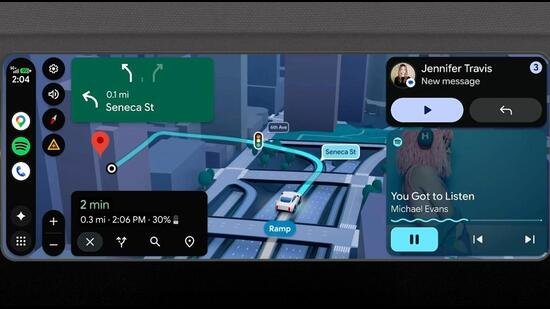
Android Auto, the connection between your Android phone and the car’s infotainment system (in supported cars; a large number now do), is lining up a significant set of improvements.
Visually, Android Auto will now be more flexible with layout depending on the infotainment system’s screen size and design. For instance, the screen size and style (or aspect ratio), is different in a Hyundai Verna compared with a Mahindra XUV700. In India, carmakers including Mahindra, Mercedes Benz, Skoda, Volvo, Renault, and Tata Motors will support the updated Android Auto.
Google is also bringing a newer Material 3 Expressive design language to the car. All of this ties in with a significant update for Google Maps.
“At the core of the new experience is immersive navigation, our biggest update to Google Maps in over a decade. It provides a vivid 3D view that reflects buildings, overpasses, and terrain, and highlights critical road details, like lanes and stop signs,” details Kim.
Gemini, as Kim notes, is already accessible in more than 250 million cars worldwide. This builds a foundation for the big Gemini Intelligence layer to arrive on Android Auto as well, via the connected Android phone.
The way this is expected to be useful is by contextualising a prompt with an existing conversation and executing steps—for instance, sending Google Maps location links to a friend you’re, maybe, meeting for lunch.


