



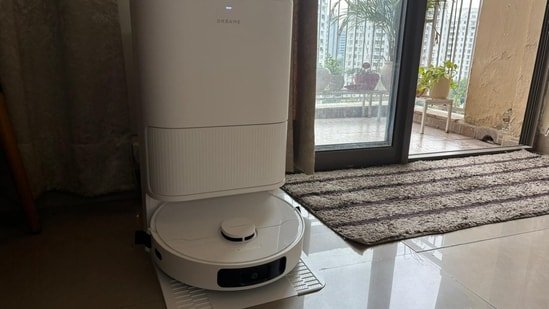
For the longest time, cleaning at home followed a fixed rhythm. Our househelp would come in every morning, sweep, mop, and leave things in order before the day really began. It worked, but not without its small issues. Some days the timing didn’t match my work calls, sometimes the cleaning felt rushed, and on a few days, it just didn’t happen at all.
Over time, I realised how dependent I had become on that routine. So when I got a chance to try the Dreame D20 Ultra Robot Vacuum Cleaner, the idea wasn’t to completely replace househelp, but to see how much of the daily cleaning it could realistically take over.
With claims like 13,000Pa suction, self-cleaning mop, and up to 100 days of hands-free use, it sounded impressive on paper. But the real question was simple—does it actually make life easier in a regular home setup?
My home setup and expectations
I live in a standard 2BHK apartment with tiled flooring, which tends to collect dust quickly, especially with Delhi NCR’s air quality. Even if you clean in the morning, there’s a visible layer by evening. Corners and under furniture are usually the areas that get ignored unless someone puts in extra effort.
Going into this, my expectations were fairly basic. I didn’t expect it to deep clean like a person would, but I did want it to handle daily dust, hair, and light dirt without needing constant supervision.
What I was unsure about was how well it would deal with corners, whether it would get stuck around furniture, and if I’d end up spending more time managing the robot than actually saving time.
Check out the Dreame D20 Ultra on Amazon
First impressions: Unboxing and what was in the box
Setting up the vacuum was easy and a little funny (more on that below).
The unboxing itself felt exciting, but not complicated. There aren’t too many parts to figure out, which is a relief. The mop pads come pre-attached, so you don’t really have to assemble anything major. Inside the box, you get the robot vacuum, the base station, a side brush, mop pad holder, pre-installed mop pads, a dust bag, a base station ramp extension plate, and the usual user manual.
All I really had to do was set up the ramp extension plate for the base station, plug everything in, and switch it on. That’s about it.
Setting up the Dreame D20 Ultra robotic vacuum cleaner
The next step is connecting it through the Dreamehome app. The app feels functional and fairly straightforward, especially if you’re familiar with basic cleaning terms. It does take a little time to understand features like zone cleaning, scheduling, and different modes, and it can be overwhelming for first-time users. After the initial setup, it becomes a simple tap-and-go experience.
Now comes the slightly funny part. The moment I turned it on, it started mapping the house on its own. It went around slowly, scanning each room, figuring out the layout. Watching it do this was oddly entertaining. It would pause around chair legs, rethink its path near wires, and sometimes take a second to decide where to go next.
There were also moments when it struggled a bit, especially while trying to find its way back to the docking station. Seeing this small, round device “figure things out” on its own was surprisingly fun.
The first few days without househelp
For the first few days, I decided to rely entirely on the robot vacuum for floor cleaning. No sweeping, no mopping by hand, just to see how it performs in a real setup.
I usually scheduled it in the morning. It starts cleaning on its own, and you don’t really have to think about it after that. Surprisingly, the noise levels are noticeable mostly only when you set it on the highest suction most. In the “Quiet” or “Standard” mode you may not get interrupted by the sound.
Watching it move around furniture was impressive with the 3DAdapt obstacle avoidance feature. It handled open areas very well, although it sometimes got stuck around dining chairs or tighter spaces but since it is a machine, it is a given. There were a couple of instances where it got stuck on a cable or struggled near a rug edge.
That said, the convenience of just pressing a button (or scheduling it) started to feel real. I didn’t have to think about cleaning, it was just happening in the background. Moreover, you don’t even have to be present in the house. If the switch is on, you can operate it from any location.
One thing I noticed was how methodical it is. It doesn’t rush, it covers areas in a planned pattern, which actually makes the cleaning feel more consistent than manual sweeping on busy days.
Dreame D20 Ultra: Cleaning performance in real life
For daily dust, it genuinely does a good job. Living in Delhi, there’s always that fine layer of dust that settles on the floor even if you’ve cleaned in the morning. I noticed this the most when I walked barefoot in the evening, normally there’s a slight gritty feeling, but on days when the vacuum had already done a full cycle, the floor felt noticeably cleaner. It’s not something you see instantly, but you do feel the difference.
There was one day when I ran it right after opening the windows in the morning, and by afternoon, the floor still felt relatively clean. That consistency is something manual cleaning sometimes misses on busy days.
Corners and edges, though, are where you start seeing the limitations. It does go close to walls, but not as deeply as a broom would. I noticed this near the corners of my bedroom and around the TV unit, if you look closely after a couple of days, there’s still a bit of dust build-up. It’s not very visible from a distance, but it’s there.
With hair, especially long strands, the performance is decent but not perfect. Most of it gets picked up during the main cleaning cycle, but I did find a few strands left behind near corners or under the bed. On one occasion, a small clump of hair near the dressing table didn’t get picked up in the first pass but was cleared in the next scheduled run.
In the kitchen, it handled dry crumbs and everyday mess quite well. Things like biscuit crumbs, small food particles, or atta dust were cleaned easily. Infact, anything sticky, like a drop of tea or a small spill also gets properly cleaned. It might not get cleaned in one mop but in the second or third run it will be sparkling clean.
The mopping function is helpful, but more in a maintenance sense. It keeps the floor looking fresh and reduces that slightly dull look you get after a day or two. I tried running it after a light spill in the kitchen, and while it did clean the area, it wasn’t as thorough as manually mopping it.
Overall, the experience feels more like having a system that maintains cleanliness daily, rather than something that replaces deep cleaning entirely. You might want to do manually cleaning once in a week, but for regular routine cleaning I was at relief.
What actually changed in my routine
After a few days, the biggest change I noticed was mental. I didn’t have to plan cleaning around my schedule anymore.
Earlier, mornings were slightly rushed, coordinating timings, making sure the house was accessible for cleaning. With the robot vacuum, I could just schedule it and forget about it.
It also helped in maintaining consistency. Even on days when you feel lazy or busy, the cleaning still gets done. That said, I didn’t completely stop feeling the need for deeper cleaning. For example, once in a few days, I still felt like doing a proper mop or cleaning corners manually.
The Dreamehome App
The Dreamehome app is where a lot of the convenience really comes in. Once you get familiar with it, you realise you don’t have to manually manage much.
You can customise cleaning based on your home setup, whether it’s the type of flooring, specific rooms, or areas with carpets and mats. The vacuum automatically adjusts its cleaning method depending on the surface, which makes it feel a bit more intuitive in daily use.
There’s also flexibility in how you want to clean. You can run a full-house cleaning cycle, select just one room, or even target a small area if there’s a spill or mess in one spot. This came in handy a few times when I didn’t want to run the entire cycle but just clean the kitchen after cooking.
You also get control over the cleaning intensity, basic, standard, or maximum, depending on how dirty the floor is. On most days, the standard mode works fine, but having the option to increase power is useful.
Another thing I liked is the ability to choose between vacuuming, mopping, or both. By default, it runs a combined cleaning cycle, but you can easily change that in the app based on your needs.
From actual usage, a few features stood out
- The app control and scheduling are genuinely useful. Being able to run it while stepping out or setting a fixed time makes it feel effortless.
- The auto-docking and self-cleaning feature is another plus. You don’t have to empty it after every use, which adds to the convenience.
- Navigation is mostly reliable, though not perfect. It learns the house layout over time, but occasional hiccups are part of the experience.
As for features that feel less important, some of the advanced app controls and customisations are good to have, but not something you’ll use daily.
Can the Dreame D20 Ultra replace your househelp? Honest answer
Short answer: not completely.
It can handle a large part of daily cleaning, especially dust and light dirt. But for deep cleaning, corners, and occasional detailed work, manual effort is still needed.
Where it really helps is in reducing dependency. Instead of needing daily help, you can manage with less frequent cleaning support.
It’s more of a support system than a replacement.
Who should buy the Dreame D20 Ultra robotic vacuum cleaner?
If you have a busy schedule, live in a smaller to mid-sized home, or just want to reduce daily cleaning effort, this makes sense.
It’s especially useful for people who want consistent cleanliness without putting in daily time.
However, if you expect it to completely take over all cleaning tasks, you might be disappointed. It works best as a maintenance tool, not a full replacement.
Using the Dreame D20 Ultra for a few days didn’t completely change how cleaning works at home, but it definitely shifted the routine.
It made daily cleaning more consistent, less dependent, and easier to manage. At the same time, it also made it clear that some level of manual cleaning is still necessary.
In a practical sense, it didn’t replace househelp entirely, but it reduced how much I rely on it. And for many homes, that in itself can be a meaningful upgrade.


