



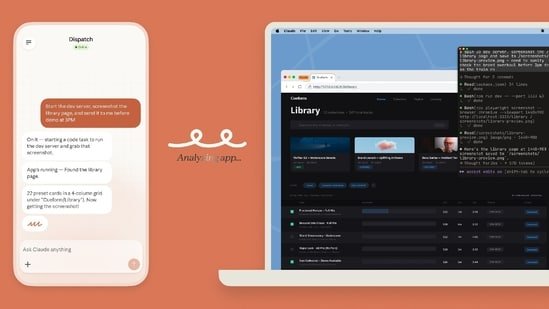
Artificial intelligence has fundamentally changed the way work is done across industries. It has made presentations and researching a topic faster. It has made fraud detection more reliable and shopping more personal. It also made it easier for photo buffs to edit their images. Now, AI is going a step ahead. Anthropic has shared a new AI tool that can control your computer and finish all your work while you are away or working on something else.
The company has announced that Claude Cowork and Claude Code can now use a user’s computer to point, click and complete tasks assigned to them. This new feature works with another feature called Dispatch, which lets users have continuous conversations with Claude on their smartphones and desktops, to complete tasks seamlessly. To put it simply, users can now have one continuous conversation with Claude on their smartphones or PCs and get it to finish any assigned task.
For the unversed Claude Cowork is an agentic AI tool designed to act as a digital employee while Claude Code is an agentic AI tool designed to help developers.
How does Claude’s new feature work?
Anthropic says that Claude uses precise tools such as Slack, Google Drive, Gmail or Google Calendar to perform the assigned task. If it doesn’t find the right tool, it navigates to Chrome browser to get the work done. In addition to this, Claude directly interacts with a user’s screen, which includes actions like clicking, typing and navigating desktop apps, to complete the tasks assigned to it.
So, what all things can Claude do?
Anthropic says that Claude can pull together a competitive analysis using local files and connected tools, and then compile it into a report. It can also open the phone simulator on a user’s phone, interact with an app and find UX issues in it. Apart from this, Claude can fill in a spreadsheet with data from multiple sources, format it, and save it to a shared folder. Claude can also navigate apps, such as internal dashboard or a specialised tool used by a user.
What’s more? Claude keeps working to finish the assigned task even as users step away. The only caveat is that the PC needs to be turned on.
What about safety?
Anthropic says that it has built in several safeguards in Claude so that users’ personal and financial data remains safe. For instance, Claude asks for a user’s permission before accessing any application. It is also trained to avoid risky operations such as transferring funds, modifying or deleting files, handling sensitive data, engaging in stock trading or investment transactions and gathering or scraping facial images. In addition to this, the company has created an app blocklist, which users can use to prevent Claude from accessing certain apps with sensitive information.
Who can use Claude’s new feature?
Claude’s new feature is available to Claude Pro and Max subscribers only. Team and Enterprise plan users don’t have access to this feature yet. For reference, Claude Pro subscription costs $17 ( ₹1,596 approximately) per month, while the Max subscription costs $100 ( ₹9,386 approximately) per month.
How to use Claude’s new feature?
Here’s a step-by-step guide of how to get Claude work for you:
Step 1: Download the latest version of Claude Desktop on your PC.
Step 2: Open the desktop app and go to Settings.
Step 3: Go to the General settings and toggle on the ‘Computer Use’ button.
Step 4: Open Cowork or Claude Code in the desktop app, start a new session to assign Claude new tasks.


