



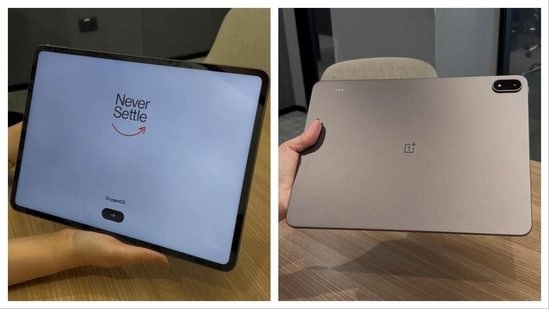
For years, tech brands have promised that a tablet can replace your laptop. Yet, time and time again, we have been burned by cramped mobile displays, underpowered mobile processors, and operating systems that feel like oversized smartphones.
The OnePlus Pad 4 arrives with the boldest claim yet: to completely dissolve the boundary between a tablet and a desktop setup. Armed with a desktop-class processor and a massive footprint, this device starts at ₹59,999 for the 8GB RAM and 256GB storage configuration, moving up to ₹64,999 for the 12GB RAM and 512GB model.
But can it truly handle your daily workday? I swapped out my trusty laptop, committed fully to this ultra-slim machine for a week, and discovered exactly where it shines, and exactly where it falls short.
Check out the OnePlus Pad 4 here
Design and first impressions: Elegantly sleek, but there’s a catch
The absolute first thing that struck me when unboxing the OnePlus Pad 4 was its striking physical appearance. It is exceptionally shiny, modern, and sleek. Tablets in this size bracket usually feel like heavy, unwieldy television screens, but OnePlus managed to squeeze this entire device into an impossibly thin 5.94 mm chassis.
My device came in the Dune Glow colorway, and it is stunning. It is a warm, luminuous, hue that provides a trendy, refreshing shift away from the boring, industrial blacks and greys that dominate the tech world.
The unboxing
Inside the box, OnePlus supplies the Pad 4 itself, a data manual, a Type-C cable, and a massive 80W SUPERVOOC Power Adapte which is a huge win at a time when major brands love deleting the charger from your packaging.
However, looking through the box, I was deeply disappointed to find no included folio case. For a premium tablet costing ₹59,999, this felt like a major omission that negatively impacts the out-of-the-box user experience. Because the metal unibody is so thin and smooth, it feels incredibly slippery in the hand.
Furthermore, a tablet of this size simply cannot be used safely without a cover. Holding a 13.2-inch slab for extended video streaming or reading becomes tiring very quickly; it absolutely requires two hands to operate safely. Without a folio case included to stand it up on a table, you are forced to spend an additional ₹2,999 right away just to comfortably consume content.
The 13.2-inch display & audio: An immersive feast for the eyes
Once you manage to prop it up, the 33.53 cm (13.2-inch) display is visually breathtaking. The sheer scale of the screen immediately grabs your attention. From a technical standpoint, OnePlus has packed this panel with a 3.4K True Colour resolution (3392*2400) and a razor-sharp density of 315 PPI.
Visuals are incredibly vivid, boasting a 12-bit color depth and 98% DCI-P3 coverage, which makes colors pop with striking accuracy. Moving across the user interface feels unbelievably fluid because the display features an adaptive refresh rate of up to 144Hz paired with a blazing 540Hz touch sampling rate. Whether I was scrolling through image-heavy social media feeds or streaming high-definition shows, the experience was cinema-level.
The spectacular visual presentation is complemented beautifully by an elite 8-speaker surround sound system. The audio quality is deep, loud, and spatially expansive. It easily fills a large room with rich sound, eliminating any need to connect an external Bluetooth speaker when watching movies or shows.
Daily usage and creative navigation
The Stylo Pro Advantage
Navigating through the system is smooth and highly intuitive. Because the display is so vast, using standard finger gestures can sometimes feel like a stretch. This is where the OnePlus Stylo Pro completely changes the dynamic. Using the stylus makes navigating the interface incredibly easy and natural, allowing me to glide through settings and files without constantly smudging the giant pane of glass.
Software layout and creative freedom
The software ecosystem, powered by OxygenOS 16.0, handles this massive canvas beautifully. The built-in multi-window and split-screen features allowed me to run more than one app simultaneously without any performance lag.
My Favorite App: I found myself spending hours inside the native Notes application. OnePlus optimised this perfectly for the Stylo Pro: you can effortlessly write handwritten notes, watch the software instantly convert your handwriting into clean digital text, and simultaneously doodle or sketch out diagrams on the side. It is incredibly fluid, making it a fantastic tool for workplace brainstorming, and it’s intuitive enough that kids will absolutely love it for digital drawing.
The laptop replacement experiment: Workstations vs travel reality
This brings us to the ultimate question: Can it successfully replace a traditional laptop workflow? The hardware performance under the hood is an absolute monster. The tablet is powered by the Snapdragon 8 Elite Gen 5 Mobile Platform, featuring an 8-core Qualcomm Oryon CPU clocked at an astonishing 4.608GHz, supported by flagship LPDDR5X RAM and lightning-fast UFS 4.1 storage. The raw processing speed is undeniable; apps launch instantly, and the system refuses to slow down.
The keyboard conundrum
However, your real-world productivity is entirely limited by your accessories. Working on a screen this large without a physical keyboard is practically impossible. Trying to type out an email using a giant on-screen virtual keyboard is slow, tiring, and highly inefficient.
Because a dedicated keyboard isn’t bundled with the tablet, I had to connect an external compatible Bluetooth keyboard and mouse to the setup. The moment those peripherals were connected, the magic happened: everything ran incredibly smooth.
The workstation experience
If you have a dedicated desk setup or a stationary home-office environment, working on the OnePlus Pad 4 feels fantastic. I was able to manage complex web browsers, edit documents, and handle multi-app communication chains exactly like I do on my traditional laptop.
The travel nightmare: The major trade-off arrives when you step away from your desk. If you need to travel or work on the move, you suddenly have to pack two additional independent devices (your separate keyboard and mouse) just to maintain your efficiency. Unlike a laptop that closes into a single unit, travelling with this unbundled setup feels clunky and compromises true on-the-go portability.
Battery endurance: Built to last the distance
Where this tablet leaves traditional laptops in the dust is its spectacular power management. It features a massive 13,380 mAh battery, the largest ever fitted inside a OnePlus mobile device.
Backed by the power efficiency of the 3nm Snapdragon chip, the tablet easily delivers up to 20 hours of continuous video playback. During my heavy workdays filled with word processing, content consumption, and aggressive multitasking, the battery consistently cruised through multiple days without requiring a trip to the wall outlet. And when it finally runs low, the bundled 80W SUPERVOOC charger replenishes that massive cell in a little over an hour.
More OnePlus pads for you
Final verdict: Is the OnePlus Pad 4 right for you?
The OnePlus Pad 4 is an engineering triumph that offers an unrivaled media consumption experience, exceptional audio, top-tier performance, and elite battery life.
If you are looking for a premium device to set up at a fixed workstation for typing, reading, note-taking, and entertainment, it is a magnificent machine that makes an incredibly strong case for retiring your laptop. However, if your work requires heavy traveling where carrying extra unattached peripherals is an annoyance, or if you expect a fully functional productivity setup straight out of the box without hidden accessory costs, a traditional thin-and-light laptop might still hold the upper hand.
Similar stories for you
Noise Pro 6R Review: A solid daily driver boosted with AI features
Disclaimer: At Hindustan Times, we help you stay up-to-date with the latest trends and products. Hindustan Times has an affiliate partnership, so we may get a part of the revenue when you make a purchase. We shall not be liable for any claim under applicable laws, including but not limited to the Consumer Protection Act, 2019, with respect to the products. The products listed in this article are in no particular order of priority.


