


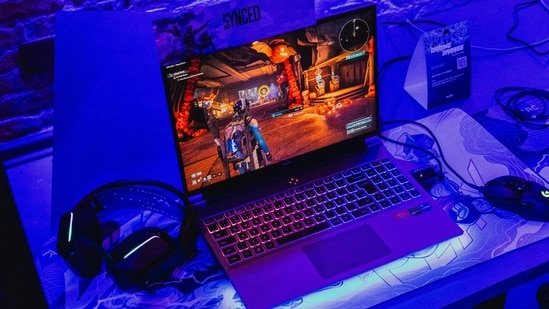
Gaming laptops have changed significantly over the last few years. Features that were once limited to premium machines, such as ray tracing, DLSS 3, DDR5 memory, and high-refresh-rate displays, are now available at more accessible price points. At the centre of this shift is the RTX 4050, a GPU that delivers a solid balance of gaming performance and value for players targeting 1080p esports titles and modern AAA games.
However, buyers should not focus on the GPU name alone. RTX 4050 laptops can deliver very different results depending on their Total Graphics Power (TGP). A higher-powered RTX 4050 generally maintains better frame rates during longer gaming sessions, while lower-powered versions often prioritise battery life and portability.
Based on hardware specifications, cooling systems, display quality, and overall value, here are some RTX 4050 gaming laptops worth considering in 2026.
The ASUS TUF Gaming A16 is aimed at users who want the highest possible performance from an RTX 4050. The GPU operates at 115W and can reach 140W through Dynamic Boost when thermal conditions allow. The laptop is powered by the AMD Ryzen 7 7445HS processor, paired with 16GB DDR5 memory and a 1TB PCIe 4.0 SSD. Memory can be expanded up to 64GB through dual SO-DIMM slots.
The 16-inch WUXGA display offers a 144Hz refresh rate and a 16:10 aspect ratio, giving users more screen space for gaming and productivity. While the 56Wh battery is sufficient for everyday tasks, gaming performance is best achieved while plugged in.
2. Acer Nitro V 15
Our Principles
Full Transparency
Every product review clearly lists the Pros and Cons, giving you a balanced view.
Brand Confidence
We focus on products from brands with a proven reputation and long-standing market trust.
The Acer Nitro V 15 combines Intel’s Core i7-13620H processor with the RTX 4050 GPU, making it a solid choice for 1080p gaming. The laptop features a 15.6-inch Full HD IPS display with a 144Hz refresh rate. Support for Thunderbolt 4 adds flexibility for external displays and accessories, while the cooling system is designed to maintain stable performance during extended gaming sessions. With DLSS 3 support and current-generation hardware, the Nitro V 15 remains relevant for both esports titles and demanding modern games.
The HP Victus 15 targets users looking for a machine that can handle both work and gaming without drawing attention in professional environments. It comes equipped with an AMD Ryzen 7 7445HS processor and NVIDIA GeForce RTX 4050 graphics. The combination is capable of handling gaming, content creation, and everyday productivity tasks.
The laptop features a 15.6-inch Full HD display with a 144Hz refresh rate, along with 16GB DDR5 RAM and a 512GB NVMe SSD. HP also includes a full-sized backlit keyboard, a webcam with noise reduction features, and a cooling setup designed to manage sustained workloads.
Lenovo’s LOQ series has built a reputation for delivering gaming-focused hardware at competitive prices, and the LOQ 15 continues that approach. The laptop runs on Intel’s Core i5-13450HX processor alongside the RTX 4050 GPU. This hardware combination is capable of handling current AAA games while also supporting multitasking workloads.
One of its key strengths is the thermal design, which uses dual fans and a hyper-chamber cooling system to manage heat during long gaming sessions. The 15.6-inch Full HD display covers 100 percent of the sRGB colour gamut, making it useful for gaming as well as content creation.
The MSI Katana A15 AI brings newer AMD silicon into the RTX 4050 segment with the Ryzen 7 8845HS processor. The laptop combines AI-assisted performance management with RTX 4050 graphics, helping optimise system resources across gaming and productivity workloads.
Its 15.6-inch display supports a 144Hz refresh rate, while 16GB DDR5 memory and a 512GB PCIe Gen4 SSD ensure quick load times. MSI’s Cooler Boost thermal solution is designed to maintain performance consistency under heavy usage.
For buyers looking for a larger display and higher refresh rate, the HP Omen 16 stands out within the RTX 4050 category. The laptop pairs an AMD Ryzen 7 7840HS processor with a higher-powered RTX 4050 configuration. It is suitable for gaming, streaming, video editing, and other resource-intensive workloads.
The 16.1-inch Full HD display supports a 165Hz refresh rate, 7ms response time, and full sRGB coverage. HP complements the hardware with 16GB DDR5 RAM, a 1TB PCIe Gen4 SSD, Bang & Olufsen-tuned speakers, and an 83Wh battery.
The AMD-powered Lenovo LOQ 15 is designed for users who frequently multitask alongside gaming. Its standout feature is the 24GB DDR5 RAM configuration, which provides additional headroom for streaming software, browser tabs, editing tools, and background applications.
The laptop combines an AMD Ryzen 7 processor with the RTX 4050 GPU and a 15.6-inch 144Hz display. Support for NVIDIA G-SYNC helps reduce screen tearing, while Lenovo’s dual-fan cooling solution works to keep temperatures under control during extended gaming sessions.
5 Things to Consider Before Buying an RTX 4050 Gaming Laptop
1. Check the RTX 4050’s TGP Rating
Not all RTX 4050 laptops deliver the same gaming performance. A higher TGP (Total Graphics Power) generally allows the GPU to sustain higher frame rates, especially in demanding AAA games. Always check the GPU power rating before making a purchase.
2. Processor Matters Too
A powerful GPU can be held back by a weaker processor. Look for laptops with modern Intel Core i5/i7 HX-series or AMD Ryzen 7 processors to ensure balanced gaming and multitasking performance.
3. Prioritise Cooling Performance
Gaming laptops generate significant heat during extended sessions. Models with efficient cooling systems can maintain performance for longer periods and reduce the chances of thermal throttling.
4. Consider Display Specifications
A 144Hz or higher refresh rate display can improve the gaming experience, especially in competitive titles. Features such as G-SYNC support, high sRGB coverage, and faster response times are worth considering.
5. Upgradeability and Storage
Check whether the laptop allows RAM and SSD upgrades. Expandable memory and additional storage slots can extend the device’s lifespan and help accommodate larger game libraries in the future.
Disclaimer: At Hindustan Times, we help you stay up-to-date with the latest trends and products. Hindustan Times has an affiliate partnership, so we may get a part of the revenue when you make a purchase. We shall not be liable for any claim under applicable laws, including but not limited to the Consumer Protection Act, 2019, with respect to the products. The products listed in this article are in no particular order of priority.
