









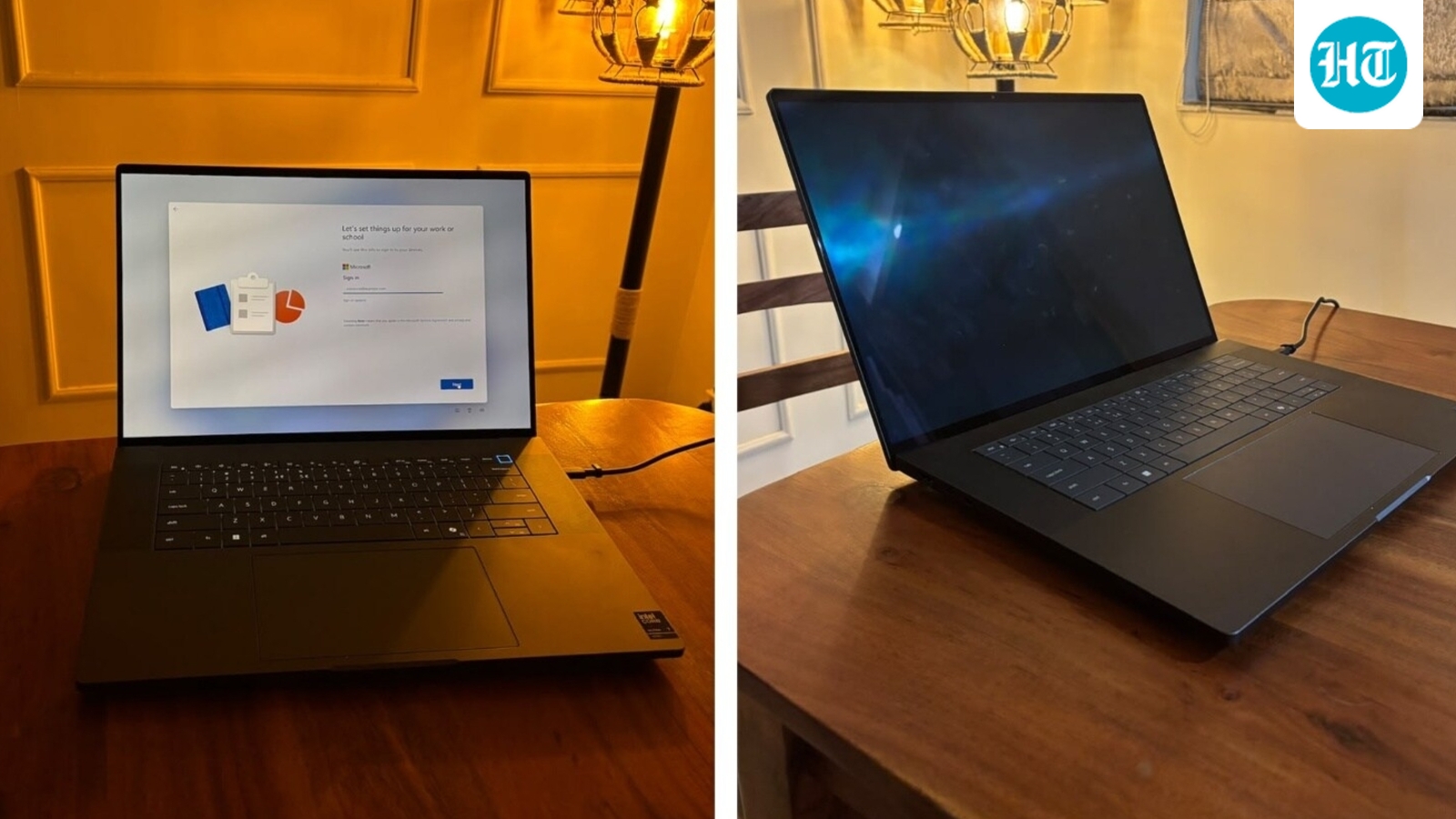
A laptop that can keep up with my workday is all I need to ensure I have a productive day without losing my mind. One that I would rather leave on my desk than carry around is a different story. I spent two weeks using the Dell Pro Precision 7 16 for my everyday work, and while its performance, responsive touchscreen and battery life made a strong impression, its weight changed how I chose to use it.
The laptop handled my workload without making me think twice about opening another browser tab, and the battery lasted through a full workday on a single charge. The large 16-inch display also gave me plenty of room to work. But does that make it the right laptop for professionals, especially when portability matters just as much as performance? Here is what stood out during my testing.
Verdict after 2 weeks: The Dell Pro Precision 7 16 is worth considering if you need a capable, large-screen work laptop for multitasking and spend most of your day at a desk. Its Intel Core Ultra X7 368H vPro processor, 32 GB RAM and 512 GB SSD make for a strong productivity configuration. Battery life was a highlight in my use, but the weight makes it less appealing for frequent travel.
Dell Pro Precision 7 16: Key specifications
Display and touchscreen: A large screen for everyday work
The 16-inch display was one of my favourite aspects of the Dell Pro Precision 7 16. It feels spacious, almost like working on a monitor, which makes a difference when you spend several hours reading, writing, researching and switching between browser tabs.
I also liked the touchscreen. Its response felt smooth during everyday use, making it easy to interact directly with the display. It is not a feature everyone will need, but it adds flexibility to the overall experience.
The larger canvas also helped keep multiple windows open without making the workspace feel cramped, particularly when cross-checking information or working across documents. For my work, which involves a fair amount of writing and research, this made long sessions more comfortable.
Design and build: Slim, but not as portable as I expected
The Dell Pro Precision 7 16 has a clean, professional appearance. Its slim profile gives it a modern look, and the large display makes it feel more like a workstation that belongs on a desk than a compact laptop designed primarily for travel.
However, my experience with its portability was different from what its thin design might suggest. I found the laptop heavy enough that I did not want to carry it around regularly. Instead, I preferred leaving it on my work desk and using it throughout the day.
This is an important consideration because a mobile workstation is not necessarily designed around the same priorities as an ultralight business laptop. Its hardware and cooling requirements can make it more substantial than a conventional notebook.
The trade-off is straightforward. If you work mostly from a fixed desk, the weight may not bother you much. But if you commute daily, travel for meetings or frequently move between workspaces, you might not consider it as a very lightweight laptop.
For general productivity, the large screen was useful in my experience. If your work involves colour-critical photography, video editing or detailed design I would recommend checking the exact panel’s resolution, brightness, refresh rate and colour coverage before purchasing.
Performance: It kept up with my everyday workload
Performance was one of the strongest aspects of my two-week experience. My work involves keeping multiple browser tabs open and switching between different tasks, so I need a laptop that can handle a busy workflow without constantly slowing me down.
The Dell Pro Precision 7 16 did this well. No matter how many tabs I opened during my regular work, the laptop remained responsive. I could move between tasks without feeling that I needed to stop and wait for the machine to catch up.
My Dell Pro Precision laptop came with a Intel Core Ultra 7 vPro processor with 32 GB RAM and a 512 GB SSD. For my everyday workload, this configuration delivered a smooth experience. The memory gives the system room to manage multiple applications, while SSD storage supports everyday file access and application loading.
However, it is important to distinguish everyday multitasking from specialised workstation workloads. For my work, I appreciated the consistency more than anything else. I did not need to keep closing browser tabs or changing the way I worked to accommodate the laptop. That makes it a capable option for professionals who need a responsive machine for a busy working day.
On-device AI: Responsive during my testing
The Dell Pro Precision 7 16 is equipped with dedicated AI hardware, powered by the Intel Core Ultra 7 processor’s integrated Neural Processing Unit (NPU) alongside the GPU. On paper, this architecture is designed to offload continuous AI workloads, such as automated video framing, background noise suppression via Dell Optimizer, local machine learning inferencing, and Windows Studio Effects, without draining system resources or impacting battery life.
To be completely candid, I did not actively test or lean into these AI features during my evaluation. My day-to-day workflow centers squarely on deep research, document drafting, large reference databases, and standard multitasking. For this style of work, the machine felt consistently fast and responsive, but that fluidity was driven by its strong core processing, ample memory, and reliable system architecture rather than any specialised AI toolsets.
If your work relies heavily on on-device AI workflows, local LLMs, or automated media processing, the dedicated silicon is ready to support it. However, if your routine mirrors mine, focused primarily on writing, analysis, and general productivity, the AI capabilities remain largely a quiet background asset rather than an active part of the daily experience.
Battery life: Lasted through my workday
Battery performance was one of the most reassuring aspects of my two weeks with the Dell Pro Precision 7 16. For a full-sized 16-inch workstation, it delivered genuine all-day endurance under my standard routine, which primarily involved heavy browser research across dozens of tabs, compiling notes, and writing in multiple documents.
On several occasions, a single charge carried through an entire workday with enough headroom left to pick up work the following morning without immediately hunting for a charger. That consistency made it effortless to use as my daily driver away from a desk.
Battery life naturally scales with screen brightness, panel technology, and workload intensity. Configurations equipped with discrete GPUs or ultra-high-resolution OLED displays will inevitably draw significantly more power than an integrated-graphics setup.
Within the scope of my research- and writing-heavy workflow, however, power management was dependable: it easily covered a full day’s work and freed me from having to plan my routine around the proximity of an AC outlet.
Keyboard and trackpad: Built for a working day
For anyone who spends the majority of their day drafting prose, transcribing notes, and cross-referencing research documents, the keyboard and trackpad are not secondary details—they define the entire experience of a laptop. On this front, the Dell Pro Precision 7 16 proved to be an exceptionally comfortable daily driver.
The 16-inch chassis allows for a spacious, uncrowded layout. Unlike some traditional bulky workstations that squeeze in an offset numeric keypad, this keyboard is centrally aligned with the screen. For sustained long-form typing, this centered posture makes an immediate difference: your hands, wrists, and shoulders remain in a natural alignment rather than being skewed to the left side of the chassis. Key travel is satisfyingly deep and tactile, offering enough resistance to prevent bottoming-out fatigue during multi-hour writing marathons.
The trackpad matches that sense of generous scale. It is expansive, smooth to glide across, and remarkably accurate with multi-touch gestures and text selection, a subtle but vital detail when you are constantly highlighting quotes, formatting drafts, or organizing split-screen research notes. Combined with the spacious palm rests, the input deck feels purpose-built for sustained, distraction-free productivity over a full working day.
Heat and fan noise: What about demanding workloads?
Thermal performance and fan noise are critical considerations on a machine of this scale. A laptop that runs uncomfortably warm on the lap or whines loudly during deep work can quickly derail focus.
In my day-to-day routine, dominated by writing, extensive multi-tab browsing, document rendering, and background syncing, the Dell Pro Precision 7 16 remained remarkably composed. The chassis stayed cool across the keyboard deck and palm rests, and the fans operated in near-silent whispers, never becoming an intrusive presence in quiet working environments.
However, it is worth contextualising what happens when you push beyond general productivity. Independent technical benchmarks of higher-tier Precision configurations, especially units fitted with discrete workstation GPUs, consistently note that the dual-fan cooling system spins up to an audible, high-frequency whine under sustained, 100% computational load.
I did not subject this unit to synthetic stress tests or continuous 3D rendering loops, and thermal profiles can vary noticeably depending on whether your spec relies on integrated graphics or a dedicated GPU. If your workflow involves heavy CAD modeling, continuous video exports, or batch compilation, the cooling system will make itself heard to protect component temperatures; for general research, writing, and administrative multitasking, it remains quiet and well-tempered.
Ports and connectivity: Useful for a workstation setup
Good ports matter when you use a laptop at a desk. In this setup, Dell gives you two fast Thunderbolt 5 ports and one Thunderbolt 4 port, which all handle power and video, plus a standard HDMI port.
This means you can easily plug into external screens, fast storage drives, and chargers without needing extra adapters or dongles. Just keep in mind that port options can change slightly on models with dedicated graphics cards, so check your exact model before you buy to make sure your cables fit.
Who should consider the Dell Pro Precision 7 16?
The Dell Pro Precision 7 16 is worth considering for professionals who need a responsive laptop for multitasking and spend most of their working day at a desk. Its large touchscreen, smooth everyday performance and workday battery experience were the main positives for me.
It is also important to choose the right configuration. Buyers running specialised professional applications should check the graphics hardware, display and software requirements rather than assuming every model in the series delivers the same performance.
Who should skip the Dell Pro Precision 7 16?
If you prioritise portability above everything else, compare its weight with lighter business laptops before making a decision. I found it heavy enough that I preferred leaving it on my desk.
It may also be more than you need if your work mainly involves basic browsing, emails and documents. In that case, a less expensive laptop may be sufficient. Conversely, if your work depends on GPU-heavy rendering or complex visualisation, verify that the integrated-graphics configuration is appropriate for your applications.
Dell Pro Precision 7 16: Pros and cons
Dell Pro Precision series 7 pricing and availablity
The Dell Pro Precision 7 Series starts at approximately ₹2,25,000 in India. Because this is primarily a commercial business-to-business (B2B) machine, it is not sold through regular consumer retail shops. You can order and configure it directly through the official Dell India website or through authorized enterprise sales partners.
Is the Dell Pro Precision 7 16 worth buying?
The Dell Pro Precision 7 16 made a positive impression during my two-week testing period. It handled my everyday workload smoothly, remained responsive with multiple tabs open and delivered battery life that covered my workday. The large touchscreen was another practical advantage.
Its biggest drawback for me was portability. Although the laptop is slim, I found it heavy enough that I preferred leaving it on my desk rather than carrying it around regularly.
Ultimately, its value depends on the price and configuration. Professionals who need a dependable work machine and spend most of the day at a workstation may appreciate the experience. Those who travel frequently should compare lighter options, while users with specialised graphics requirements should make sure they choose the right hardware.
Is the Dell Pro Precision 7 16 good for multitasking?
In my two-week testing, the laptop handled my everyday workload smoothly, even with multiple browser tabs open. My review unit has an Intel Core Ultra 7 vPro processor and 32 GB RAM.
How long does the Dell Pro Precision 7 16 battery last?
The battery lasted through a full workday of heavy work during my testing. Actual results depend on workload, settings and hardware configuration.
Does the Dell Pro Precision 7 16 have a touchscreen?
Yes, my review unit has a touchscreen. I found its response smooth during everyday use, and the 16-inch display provided a spacious working area.
Is the Dell Pro Precision 7 16 easy to carry?
I did not find it particularly convenient to carry around. Although it has a slim profile, it felt heavy enough that I preferred keeping it on my work desk.
Which processor, RAM and storage does the review unit have?
My review unit has an Intel Core Ultra 7 vPro processor, integrated Intel Graphics, 32 GB RAM and a 512 GB SSD.
Is the Dell Pro Precision 7 16 suitable for AI workloads?
The AI features I tried responded quickly during everyday use. However, buyers planning to run demanding local AI models should check the exact processor, NPU capabilities, memory and graphics configuration before purchasing.
Is the Dell Pro Precision 7 16 worth buying?
It may suit professionals who need smooth everyday performance, a large touchscreen and battery life that covers a full workday. Its weight, price and configuration should be considered before making a final decision.


