



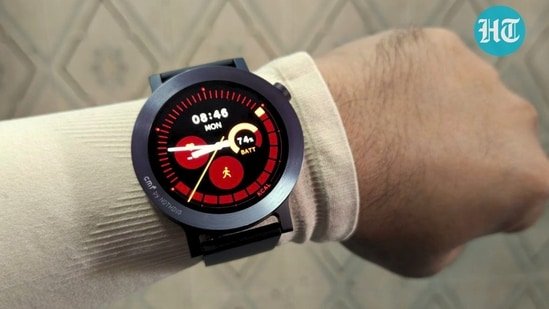
CMF Watch 3 Pro: Nothing has steadily turned CMF into a serious player in the budget wearable space, and the CMF Watch 3 Pro shows the brand aiming higher than before. It comes with a larger AMOLED display, dual-band GPS, AI-backed features, and a redesigned companion app – all while keeping pricing aggressive. That makes it look like an easy upgrade over its predecessor, but the real experience is a little more complicated. After using the smartwatch daily for over two weeks – during workouts, office runs, and regular day-to-day use, here’s what worked well, what fell short, and whether the CMF Watch 3 Pro is worth buying.
MD Ijaj Khan
CMF Watch 3 Pro Review: Design and Display
Nothing hasn’t changed much about how the CMF Watch 3 Pro looks, and I think that’s the right call. The circular case, the dot-matrix UI touches, the clean aluminium build – it all still works. When something isn’t broken, you leave it alone. I got the Dark Grey variant for review, which pairs matte metal with a matching silicone strap, and it’s the kind of watch you forget you’re wearing, which, for a daily driver, is a compliment.
The build feels more confidence-inspiring than its predecessor. Picking it up, the aluminium case has a solidity to it that the Watch Pro 2 never quite achieved. At 51.9 grams, it’s light enough not to bother you, but substantial enough not to feel cheap. The silicone strap is soft, doesn’t tug at arm hair, and holds its shape well. One thing I do miss: the swappable bezels are gone this time. If personalisation was part of the appeal for you, that option has been quietly dropped, and the price has gone up anyway, which stings a little.
The rotating crown on the right side handles navigation, waking the screen, going back, and scrolling through apps. It gets the job done, though it lacks the satisfying click of more expensive watches. On the rear, the heart rate and SpO2 sensors glow green and red during readings, which looks a bit theatrical, but the accuracy is reasonable. You also get Bluetooth 5.3, a full sensor suite, and IP68 water resistance. Nothing advises against swimming or saltwater use, so treat it as splash-proof rather than swim-proof.
Display
The screen is the headline upgrade: a 1.43-inch AMOLED at 460×460 pixels, up from 1.32 inches on the last model. In use, the difference is real; everything feels more spacious and easier to tap accurately. Brightness tops out at 670 nits with an auto mode that actually reacts quickly when lighting conditions shift. Walking from an air-conditioned office into the afternoon sun, it adjusted without me having to think about it.
That said, it’s not without issues. The always-on display is frustratingly dim, so dim that it barely functions as one. I like having the time visible without lifting my wrist, but this AOD makes you work for it. The battery drain isn’t worth what you get in return.
Then there’s the 60Hz refresh rate. Fine in theory, but you notice the ceiling. Scroll at a normal pace, and it’s okay. Push it even slightly, and the motion turns choppy – text that looks perfectly sharp when still bleeds into haze the moment you swipe. At this price point, it’s acceptable, but competitors are starting to raise the bar here. In short, the display is good, occasionally very good – just not without its rough edges.
CMF Watch 3 Pro: UI, Companion App, and Features
Nothing has kept the Watch 3 Pro’s software familiar. The dot-matrix aesthetic runs through menus, icons, and watch faces, and if the look worked for you before, it still does.
The bigger change is the companion app. The old CMF Watch app has been replaced by the Nothing X app, split into My Devices and Health tabs. It’s clean, intuitive, and genuinely well thought-out – the home screen even mirrors your watch’s exact colourway, a small detail that adds more personality than you’d expect. Other brands could learn from this.
On the other hand, the Health tab tracks workouts, active calories, and standing reminders through a running track graphic instead of Apple-style rings. It works. Heart rate monitoring now lets you set check-in frequency rather than just toggling it on or off, a welcome step up. Sport modes now sit at 131, which covers almost anything you’d want.
The Watch UI is a Different Story
The companion app feels polished; the watch’s own interface, less so. Navigation isn’t immediately obvious – it took me a few days to stop second-guessing where things were. Notifications pull from the bottom, and you cycle between screens rather than scrolling a single menu. There’s also a slight crown-press lag that’s hard to ignore once you notice it. Given how intuitive the app feels, the watch UI should’ve matched that standard.
Features and Limitations
Running a custom RTOS means no Wear OS, no Play Store, no NFC payments, and no LTE. If those matter to you, look elsewhere. For everyone else, the core experience holds up – swipe navigation is smooth, the rotating crown feels natural, and the double-press shortcut is handy.
Essential News reads personalised headlines through the watch speaker. Sounds gimmicky, genuinely useful after a few days. Recording Transcription lets you record a voice memo on the watch and get a transcribed text on your phone, which is accurate, but a fairly niche use case. ChatGPT works through your smartphone rather than natively.
Standard features: notifications, Bluetooth calling, music controls, camera shutter, weather, and a flashlight are all present and stable, even on iPhone.
GPS and Health Tracking
Dual-band GPS is the headline hardware upgrade. Lock times are faster, route accuracy is meaningfully better, and for runners, this alone justifies the upgrade. VO2 Max, recovery metrics, training load, and an AI running coach round out a fitness package that feels more serious than earlier CMF wearables.
Heart rate, SpO₂, and sleep tracking are all reliable for daily use – sleep tracking in particular handles wake-up detection well. Lastly, the weather widget includes outdoor AQI, the music controller now shows album artwork, and the camera shutter has a timer built in. Small things, but they add up. In short, the CMF Watch 3 Pro isn’t competing with Wear OS. Within its own lane, it mostly gets the job done.
CMF Watch 3 Pro Review: Bluetooth Calling & Battery Life
Bluetooth calling works well here. The watch handles call logs, a dial pad, and up to 30 saved contacts managed through the app. Indoors, call clarity is solid – voices come through cleanly on both ends. Outdoors, the AI noise cancellation does a decent job cutting through traffic noise. Not perfect, but noticeably good.
Battery life is where the Watch 3 Pro earns some respect. Nothing claims 13 days with average use, 60 days in power saving mode, and around 17 hours with continuous GPS. In real-world use, auto brightness, heart rate checks every five minutes, sleep tracking, workout logging, and regular notifications- I consistently hit seven days. That’s not the advertised figure, but it’s still comfortably ahead of most Wear OS watches.
Charging is straightforward: zero to full in about 90 minutes via the magnetic charger, and a 10-minute top-up gives you roughly 20% back, useful when you’re rushing out. Nothing flashy, but it works exactly as it should.
Final Verdict
The CMF Watch 3 Pro punches well above its Rs. 7,999 price tag. The bigger AMOLED display looks great, dual-band GPS is a meaningful upgrade for runners, the battery comfortably lasts a week, and the Nothing X app is genuinely one of the nicer companion experiences in this segment. Nothing has been clearly put thought out into where it matters. That said, the always-on display is nearly pointless, the watch UI feels rougher than it should, swappable bezels are gone, and the 60Hz refresh starts showing cracks when you push it. No NFC or Wear OS either, so if those are non-negotiables, look elsewhere. But for most people who just want a reliable, well-designed smartwatch that doesn’t ask too much of your wallet, the CMF Watch 3 Pro gets the job done, and then some.


