



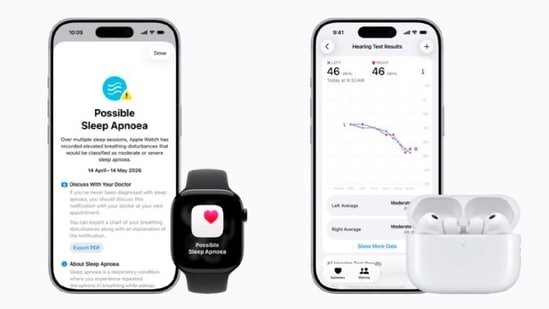
Apple today announced the availability of two of its biggest and most important health features in India. First is the sleep apnea detection feature that arrives on Apple Watch and the second is the hearing test feature, which will be available on the Apple AirPods Pro.
It is worth mentioning that the company had first announced these features back in September 2024. However, at the time these features were available in select countries including the US, Japan and part of the European Union. Now, almost a year-and-a-half later, Apple has secured all the regulatory approvals, post which it has started rolling out these features to Apple device users in India.
Sleep apnea notifications on Apple Watch
With the latest update, Apple Watch users will be able to check if they have sleep apnea. For the unversed, Sleep apnea is a disorder wherein an individual momentarily stops breathing during sleep, which prevents the body from getting enough oxygen. Apple says that if left untreated, it can lead to hypertension, type 2 diabetes, and cardiac issues.
To detect sleep apnea, Apple has introduced a new metric called Breathing Disturbances. This metric uses an accelerometer to detect small movements at the wrist associated with interruptions to normal respiratory patterns during sleep. The Apple Watch then analyses the collected data every 30 days to check irregularities in breathing patterns and for signs of sleep apnea. When detected, users can share the collected data with their doctors and get treated for the same.
Who will get it: The sleep apnea detection feature is being rolled out to Apple Watch Series 9 and newer versions, Apple Watch Ultra 2 and Apple Watch SE 3 with the latest watchOS update.
Requisites: To use this feature, users need to update their iPhones to the latest available iOS version. They also need to set up sleep with Sleep Tracking on Apple Watch. Additionally, users need to wear their Apple Watches for a minimum of 10 nights over a 30-day period to for this feature to work accurately.
How to turn on sleep apnea notifications on your iPhone
Here’s a step-by-step guide for your reference:
Step 1: Download the latest available iOS version on your iPhone.
Step 2: Open the Health app on your iPhone.
Step 3: Tap Search and then tap Respiratory.
Step 4: Under Sleep Apnea Notifications, tap Set Up, then tap Next.
Step 5: Confirm your date of birth and if you’ve ever been diagnosed with sleep apnea, then tap Continue.
Step 6: Tap Next and then tap Done.
Hearing test feature comes to AirPods Pro
Another health feature that Apple introduced for Indian users is the ability to test their hearing. The company says that this feature uses a clinical-grade hearing test based on the standard clinical approach called pure-tone audiometry to help users detect issues with their hearing.
When a user completes the hearing test, they will see an easy-to-understand summary of their results, including a number representing hearing loss in each ear and recommendations. These results will be stored privately and securely in the Health app, and can be shared with a doctor for further conversation.
Who gets it: This new hearing test feature is compatible with both iPads running iPadOS 18 and iPhone running iOS 18. This feature is being rolled out to AirPods Pro 2 and newer devices.
Requisites: To use this feature, users need to update their iPhones and iPads to the latest available iOS and iPadOS versions. They also need to download the latest firmware update on their AirPods Pro 2.
How to take the hearing test
Here’s a step-by-step guide for your reference:
Step 1: Find a quiet place to take the test and then put on the AirPods Pro.
Step 2: Go to Settings and then go to your AirPods Pro.
Step 3: Tap Take a Hearing Test and then follow the instructions.
Step 4: When the Hearing Test starts, tap the screen when you hear a tone.
Apple notes that during the test, tones will be pulsed three times to give users time to respond to the tone played. However, they only need to tap one time to register their response. Once the test is done, users will get a summary of their results.


