


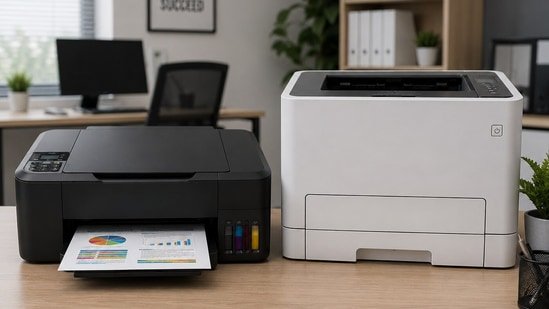
Buying a printer in 2026 is less about the machine and more about the long-term cost. A low-priced printer can become expensive within months if ink refills, toner replacements, or maintenance start adding up. Over the last few years, I’ve tried and tested multiple home and office printers across HP, Canon, Epson, and Brother models, and one thing has become clear – the better printer depends entirely on how often you print and what you print
If your work mostly includes colour pages, school projects, photos, and mixed home use, ink tank printers still make more sense financially. But if your usage is focused on PDFs, contracts, invoices, and bulk black-and-white printing, laser printers remain the safer long-term investment.
Ink Tank vs Laser Printer: What Changes in Real Usage?
Ink tank printers are built for users who print regularly. Since they use refillable ink reservoirs instead of cartridges, the cost per page stays low, especially for colour printing. They are practical for students, families, and small offices handling daily printing work. The only catch is maintenance. If the printer sits unused for weeks, ink can dry inside the print heads.
Laser printers work differently. They use toner powder instead of liquid ink, which means there is no risk of drying. They are faster, more reliable for documents, and easier to maintain if your printing pattern is irregular. In my experience, users who print occasionally usually face fewer problems with laser printers than with ink-based machines.
Best Ink Tank Printers to Consider in 2026
The HP Smart Tank 589 is designed for users who want low running costs without giving up wireless features. It supports printing, scanning, and copying while offering app-based setup through the HP Smart App. HP’s spill-free refill system also makes ink top-ups less messy compared to older ink tank models. The printer delivers up to 4,000 black and 6,000 colour pages, making it practical for homes with regular printing needs. In real usage, the print quality remains consistent for documents, assignments, and occasional photo printing. Its self-healing Wi-Fi feature also helps maintain stable wireless connectivity during daily use.
What are buyers saying on Amazon?
Users like how cheap printing becomes with the big ink bottles and find the setup simple over Wi‑Fi. They appreciate its compact size and that it handles daily home‑office and school work well.
Why choose this product?
Choose this if you want a very low printing cost for everyday documents and photos at home or a small office. It’s good if you prefer a compact, all‑in‑one machine with wireless printing and minimal fuss.
Epson’s EcoTank series continues to focus on high-volume printing, and the L3210 follows the same approach. This printer is built for users who print heavily but do not necessarily need wireless support. It connects through USB and delivers page yields of up to 4,500 black and 7,500 colour pages. During testing, Epson printers usually perform well in colour accuracy and bulk printing workloads. The compact size also makes the L3210 easier to place in smaller workspaces or study rooms. However, the lack of Wi-Fi may feel limiting for users who rely on smartphone printing.
What are buyers saying on Amazon?
Buyers highlight the low running cost and the convenience of the built‑in ink tanks. They like that it is compact, easy to connect, and good for home‑office work and occasional photos.
Why choose this product?
Choose this if you want a budget‑friendly, space‑saving printer for everyday documents and light photo printing. It suits students, small homes, or small businesses that print frequently but don’t need high‑speed or heavy-duty.
The Canon PIXMA E4570 targets home users looking for an all-in-one printer with wireless support and automatic duplex printing. It combines printing, scanning, and copying in a compact setup while supporting borderless printing for photos and creative work. The printer includes a 600 x 1200 dpi scanner and supports print resolutions up to 4800 x 1200 dpi. Canon has also added a 100-sheet paper tray, making it suitable for moderate home and office usage. In day-to-day use, the E4570 works best for mixed workloads where users print both documents and occasional colour graphics.
What are buyers saying on Amazon?
Buyers like that it is compact and easy to set up, and praise the low running cost thanks to Canon’s high‑capacity ink. Many mention it is reliable for home‑office documents and school‑related work.
Why choose this product?
Choose this if you want a compact, budget‑friendly all‑in‑one that can also fax and scan. It is ideal for home office, small business, or students who need occasional colour printing and scanning without spending much on ink.
Best Laser Printers to Consider in 2026
The HP 303d is built for users who need fast monochrome printing without extra functions like scanning or copying. It supports automatic duplex printing and can deliver print speeds of up to 30 pages per minute. HP recommends it for monthly print volumes between 300 and 2,300 pages, making it suitable for small offices and business users handling paperwork regularly. The printer also includes a 250-sheet input tray and supports multiple paper sizes. In practical usage, laser printers like the 303d remain easier to maintain because toner does not dry out even if the machine remains unused for long periods.
What are buyers saying on Amazon?
Users like the clean, professional laser prints and the automatic two‑sided printing. They appreciate the wireless setup and that it runs quietly, making it suitable for office or home‑office use.
Why choose this product?
Choose this if you need fast, high‑volume black‑and‑white documents with low running costs over time. It is ideal for offices, professionals, or home‑office users who print lots of PDFs, reports, and letters.
The Canon MF3010 combines printing, scanning, and copying into a single monochrome laser device aimed at home offices and light business use. It delivers print speeds of up to 18 pages per minute and includes a CIS scanner with support for high-resolution scans. The compact design helps it fit into tighter workspaces without taking up much desk space. Canon has also included ID card copy functionality and zoom adjustment features, which can be useful in small office environments. In long-term usage, this printer works well for users who mainly print text documents and occasional scanned paperwork.
What are buyers saying on Amazon?
Buyers like that it is small, quiet, and easy to set up with a computer. Many appreciate that it prints crisp black text for documents and is good for low‑volume everyday printing.
Why choose this product?
Choose this if you want a simple, compact laser printer for basic document printing without colour or fancy features. It suits students, home‑office workers, or small offices that print modest volumes.
Brother’s DCP-L2541DW remains one of the more balanced monochrome laser printers for home and office users. It supports printing, scanning, and copying while also offering automatic duplex printing and wireless connectivity. The printer can deliver speeds of up to 30 pages per minute and includes support for USB, Ethernet, Wi-Fi, and Wi-Fi Direct. From my experience reviewing Brother printers, they usually perform consistently in long-term document printing because toner efficiency remains stable over time. The compact design also makes it practical for users working with limited desk space.
What are buyers saying on Amazon?
Users praise the speed and reliability of colour laser prints, especially for office documents and presentations. Many like the duplex and network features, saying it fits well in a small office or shared workspace.
Why choose this product?
Choose this if you need a robust, networked colour laser printer for a small or medium office. It suits teams that print mixed documents and colour reports and want a machine that can handle moderate to high monthly volumes.
The Canon MF746Cx is designed for office users who need colour laser printing alongside scanning and copying functions. It supports print resolutions up to 1200 x 1200 dpi and can print both monochrome and colour documents at speeds of up to 27 pages per minute. The printer also supports automatic duplex printing and wireless connectivity for office workflows. While colour laser printers still cost more upfront than ink tank models, they are useful for businesses that regularly print presentations, reports, and graphics-heavy documents without relying on liquid ink systems.
What are buyers saying on Amazon?
Buyers like the speed and reliability of colour prints and the ease of sharing them across a small office network. Many mention that the automatic duplex and the ADF make it convenient for reports, presentations, and shared workspaces.
Why choose this product?
Choose this if you need a robust, networked colour laser printer for a small or medium office. It is ideal for teams that print mixed documents and colour pages regularly and want a machine that can handle several thousand pages per month without fuss.
5 Things to Consider Before Buying a Printer
1. What you’ll actually print and how often
Decide whether you mainly need fast black‑and‑white documents (monochrome laser) or occasional colour work (inkjet or colour laser). If you print a lot, a laser or ink‑tank printer will save money over time.
2. Running cost vs upfront price
Check the cost per page and bottle/toner yield. Ink‑tank printers (like HP Smart Tank, Epson EcoTank, Canon E4570) have low running costs but may cost more up front; lasers are slightly pricier overall but very efficient for high‑volume text printing.
3. Space, weight, and daily use
Compact inkjet printers are easier to fit on a study table or small desk and are lighter to move. Larger colour‑laser machines (like Canon MF746Cx) are bulkier and better for a shared office or fixed corner.
4. Duplex, Wi‑Fi, and connectivity
For home‑office and small‑business use, automatic duplex (two‑sided printing) and Wi‑Fi make life much easier. If you share the printer across multiple devices, network support (Wi‑Fi + Ethernet) is worth paying extra for.
5. Features you’ll actually use
Fax and ADF are handy for small offices that scan and send documents regularly, while students and casual users may be fine with basic print‑scan‑copy. Match the features (fax, duplex, ADF, mobile printing) to your real‑world usage, not just the spec sheet.
Disclaimer: At Hindustan Times, we help you stay up-to-date with the latest trends and products. Hindustan Times has an affiliate partnership, so we may get a part of the revenue when you make a purchase. We shall not be liable for any claim under applicable laws, including but not limited to the Consumer Protection Act, 2019, with respect to the products. The products listed in this article are in no particular order of priority.
