


I didn’t plan on falling for a monitor. My desk setup had been the same laptop-on-a-stand arrangement for over a year, the kind you build during a rough patch and then just… stop thinking about. But after one too many days squinting at a 14-inch screen while trying to compare spec sheets side by side, I finally gave in and put the Lenovo L24D-4C on my desk for three weeks. This review is what came out of that.
First Impressions
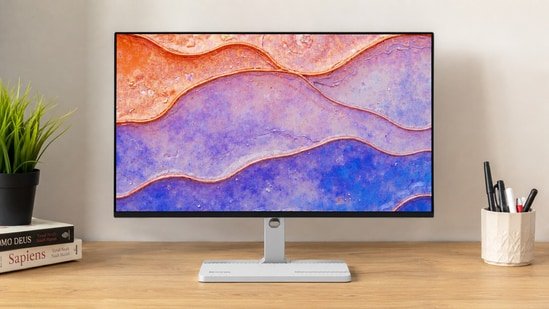
The Lenovo L24D-4C doesn’t try to impress you the moment you unbox it, and that’s sort of the point. It comes in a Cloud Grey finish, slim bezels, a base that doesn’t hog desk space, and a stand that snaps together in about two minutes without a screwdriver hunt. My desk in Delhi isn’t large, and I’ve had monitors before that made the whole setup feel cramped. This one didn’t. It just sat there, unbothered, looking like it belonged in an office rather than a gaming den.
Lenovo L24D-4C Monitor Review: Design That Prioritises Function Over Flash
There’s nothing particularly striking about the Lenovo L24D-4C, and that’s perfectly fine. The slim bezels make it feel modern, while the muted Cloud Grey finish blends into almost any workspace without drawing attention. More importantly, Lenovo has kept the footprint compact enough that it doesn’t dominate a smaller desk.
What I appreciated most wasn’t the design itself but how clean the entire setup became. My laptop, keyboard, wireless mouse receiver and external SSD all stayed connected to the monitor. Every morning, plugging in a single USB-C cable instantly turned my laptop into a complete workstation. It’s the kind of convenience that doesn’t show up on a specification sheet but quickly becomes part of your routine. That said, Lenovo’s cost-cutting is obvious elsewhere. The stand only supports tilt adjustment. No height adjustment. No swivel. No pivot.
For a monitor clearly aimed at professionals who spend eight or nine hours in front of the screen, this feels like an unnecessary compromise. Within two days, I had already placed the monitor on a stand to bring it closer to eye level.
Lenovo L24D-4C Monitor Review: The Display Is Good, Until You Notice What Lenovo Left Out
The Lenovo L24D-4C features a 23.8-inch IPS panel with Full HD resolution and a 144Hz refresh rate. The IPS panel delivers what you’d expect. Viewing angles remain consistent, colours don’t shift dramatically and the matte coating does a good job controlling reflections.
Lenovo also claims 99% sRGB colour coverage, and that broadly matches my experience. Colours appear balanced instead of artificially saturated, making the monitor suitable for web content, basic photo editing and everyday creative work. Where the display starts losing ground is resolution. This isn’t because Full HD looks bad, it doesn’t.
It’s because Lenovo has positioned this as a productivity monitor with USB-C docking, and productivity benefits more from extra pixels than extra refresh rate. When I was researching stories with multiple browser windows open or editing long articles, I repeatedly wished for the additional workspace that a QHD panel provides. Text remains readable, but after working on sharper displays, the difference becomes difficult to ignore.
That’s probably my biggest criticism of this monitor. The hardware feels built for professionals, while the resolution feels aimed at budget buyers.
It’s a USB-C dock disguised as a monitor. And I mean that as a compliment.
One cable handled charging my laptop, video output and every USB accessory connected to the monitor. That eliminated the daily ritual of connecting an HDMI cable, laptop charger, keyboard receiver and USB hub separately. It’s difficult to appreciate this feature until you’ve lived with it. After a week, unplugging one cable before leaving my desk felt effortless. Going back to my older setup, with cables hanging from every side of the laptop, felt unnecessarily complicated. For professionals who regularly switch between office and home, this may genuinely become the monitor’s biggest selling point.
Speakers Exist. That’s the Review
Two 3-watt speakers, present because a monitor needs some way to make sound, not because anyone tested them and thought “this is good enough to skip headphones.” They’re thin, they get quiet at the top end, and I stopped using them after the first evening. Don’t factor them into your buying decision at all.
Where Lenovo Could Have Done Better
This is a good monitor, but it’s also one that feels slightly held back by its own pricing strategy. The biggest omission is the Full HD resolution. In a market where affordable QHD monitors are becoming increasingly common, Lenovo’s decision feels conservative.
The stand deserves equal criticism. USB-C docking encourages long working hours, yet the lack of height adjustment means many users will immediately look for a monitor riser or VESA arm. Brightness is another area where expectations should remain realistic. Indoors it’s perfectly comfortable, but under strong natural light I found myself keeping brightness close to maximum. None of these are deal-breakers individually. Together, however, they stop the L24D-4C from feeling like a complete package.
Final Verdict
The Lenovo L24D-4C monitor is easy to misunderstand if you focus only on its specifications. This isn’t the best gaming monitor under Rs. 15,000, nor is it the sharpest productivity display you can buy today. Its real value lies elsewhere. It replaces your charger, USB hub and monitor with a single device, making your workspace noticeably cleaner and your daily routine considerably simpler. After spending time with it, that’s the feature I appreciated most, not the 144Hz refresh rate.
At the same time, Lenovo has made compromises that deserve scrutiny. The Full HD resolution feels dated for a productivity-focused monitor, while the lack of height adjustment undermines an otherwise office-friendly design. If your priority is a clean USB-C workspace and you mostly work on documents, browse the web and enjoy occasional gaming, the Lenovo L24D-4C is a sensible choice.
If you’re buying a monitor you’ll keep for the next five years and spend your entire workday in front of, I’d seriously compare it against similarly priced QHD alternatives before making a decision.
Disclaimer: At Hindustan Times, we help you stay up-to-date with the latest trends and products. Hindustan Times has an affiliate partnership, so we may get a part of the revenue when you make a purchase. We shall not be liable for any claim under applicable laws, including but not limited to the Consumer Protection Act, 2019, with respect to the products. The products listed in this article are in no particular order of priority.
